
Introduction
Having no water at home can be frustrating, especially when you do not know what caused the problem or when the water will come back.
If you live in Ekurhuleni, you can report a water outage to the City of Ekurhuleni. The City lists “No water” as a water and sewer service issue that residents can report. Other water-related problems that can be reported include water leaks, leaking fire hydrants, faulty water meters and dirty or bad-smelling water.
There are several ways to report a water problem. You can use the City’s service call centre, email, the My CoE App, or Siyakhokha.
This guide explains how to report a water outage in Ekurhuleni, including how to use the Siyakhokha website to submit a support query.
2. Who This Guide Is For
This guide is for people who live in areas served by the City of Ekurhuleni Metropolitan Municipality.
It can be useful for residents in areas such as:
- Benoni
- Boksburg
- Brakpan
- Daveyton
- Edenvale
- Germiston
- Katlehong
- Kempton Park
- Nigel
- Springs
- Tembisa
- Tsakane
- Other areas within Ekurhuleni
The guide can also help:
- Homeowners
- Tenants
- Families
- Landlords
- Businesses
- Community members reporting a water problem affecting several properties
If you are reporting a problem for your street or neighbourhood, try to provide as much information as possible about the affected area.
3. Requirements
Before reporting the water outage, prepare the following information if you have it:
- Your full name
- Contact number
- Residential address
- Municipal account number
- Suburb
- Town
- Street name
- House or unit number
- Nearest intersection
- Nearby landmark
- Date the water stopped
- Approximate time the water stopped
- Description of the problem
- Whether your neighbours are also affected
The City advises residents to provide their full name, contact details, address, suburb, town, nearest crossroad and nearby landmark when reporting service-related problems. Residents are also advised to get a reference number for future follow-ups.
If you are using Siyakhokha
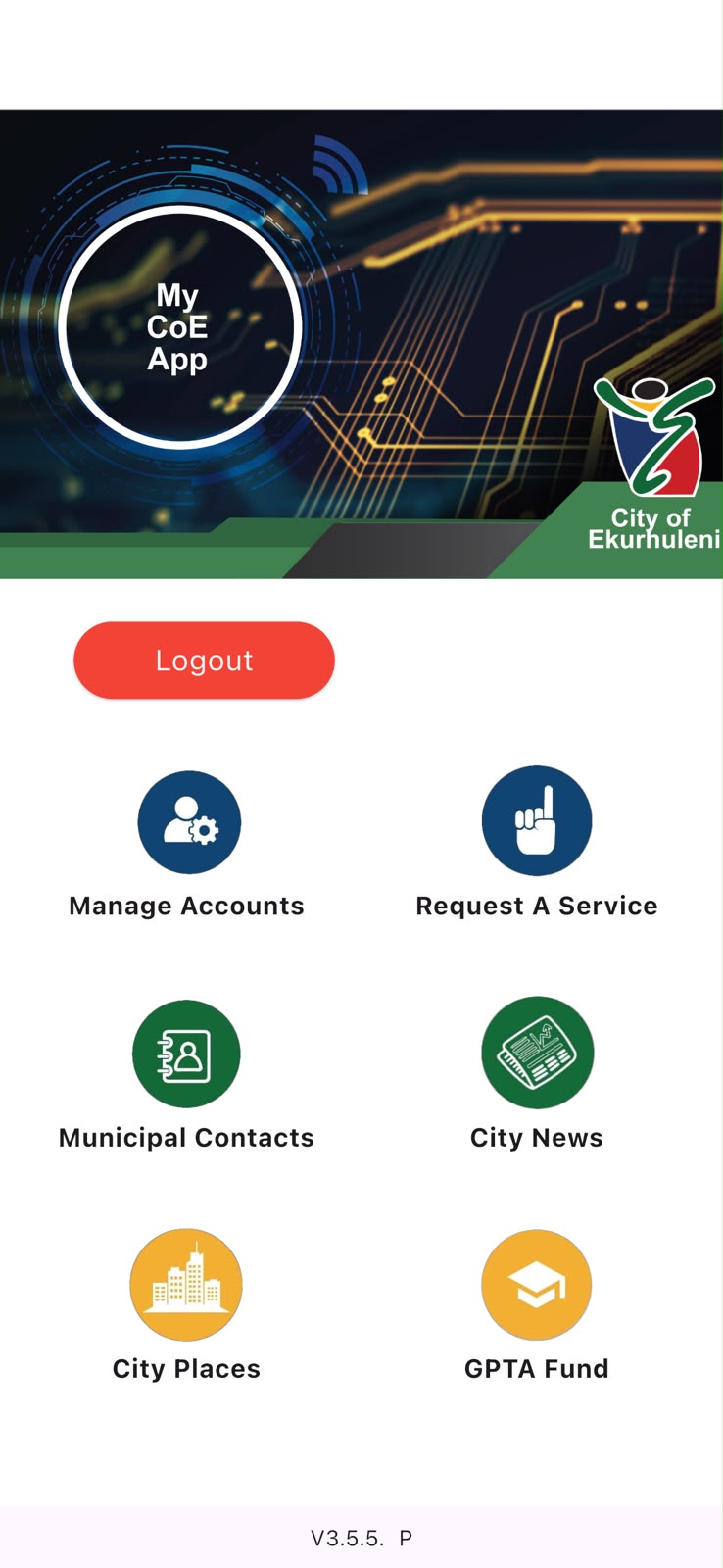
You will need a Siyakhokha account to log in.
If you do not have an account, the Siyakhokha login page provides a Register option.
You can access the official portal here:
Siyakhokha Login – City of Ekurhuleni
4. Step-by-Step Guide
Step 1: Check whether you really have a water outage
Before reporting the problem, check whether the issue is only inside your property.
Open more than one tap if possible.
You should also check with your neighbours.
If only your house has no water
The problem could be related to:
- Your internal plumbing
- Your water meter
- A closed valve
- A private water pipe
- A problem on your property
If several houses have no water
The problem may be related to the municipal water supply.
In this case, report the problem to the City.
How to Report a Water Outage Using Siyakhokha
Siyakhokha is an online City of Ekurhuleni platform that residents can use for municipal services.
The City has specifically identified the Siyakhokha website as one of the platforms that can be used to report service delivery interruptions.
The Siyakhokha user manual also provides a Create a Support Query function for lodging complaints, requests and queries.
Step 2: Open the Siyakhokha website
Go to the official Siyakhokha login page:
You will see fields for:
- Username
- Password
There is also a Register option if you do not have an account and a Forgot Username and Password? option if you cannot access your account.
Step 3: Register for Siyakhokha if you do not have an account
If you have never used Siyakhokha before, select Register.
Follow the registration instructions on the website.
After registering and activating your account, return to the login page and sign in.
If you already have an account, simply enter your username and password.
Step 4: Log in to your Siyakhokha account
Enter your:
Username
and
Password
Then select Login.
After you successfully log in, you can access the services available through your Siyakhokha dashboard app.
Step 5: Go to My Dashboard
Once you are logged in, look for My Dashboard.
The Siyakhokha user manual states that the Request a Service then Create a Support Query function is available from the dashboard.
This is the section you should use to report your water problem.
Step 6: Select “Create a Support Query”
Select:
Create a Support Query
The Siyakhokha manual explains that this section is used to lodge:
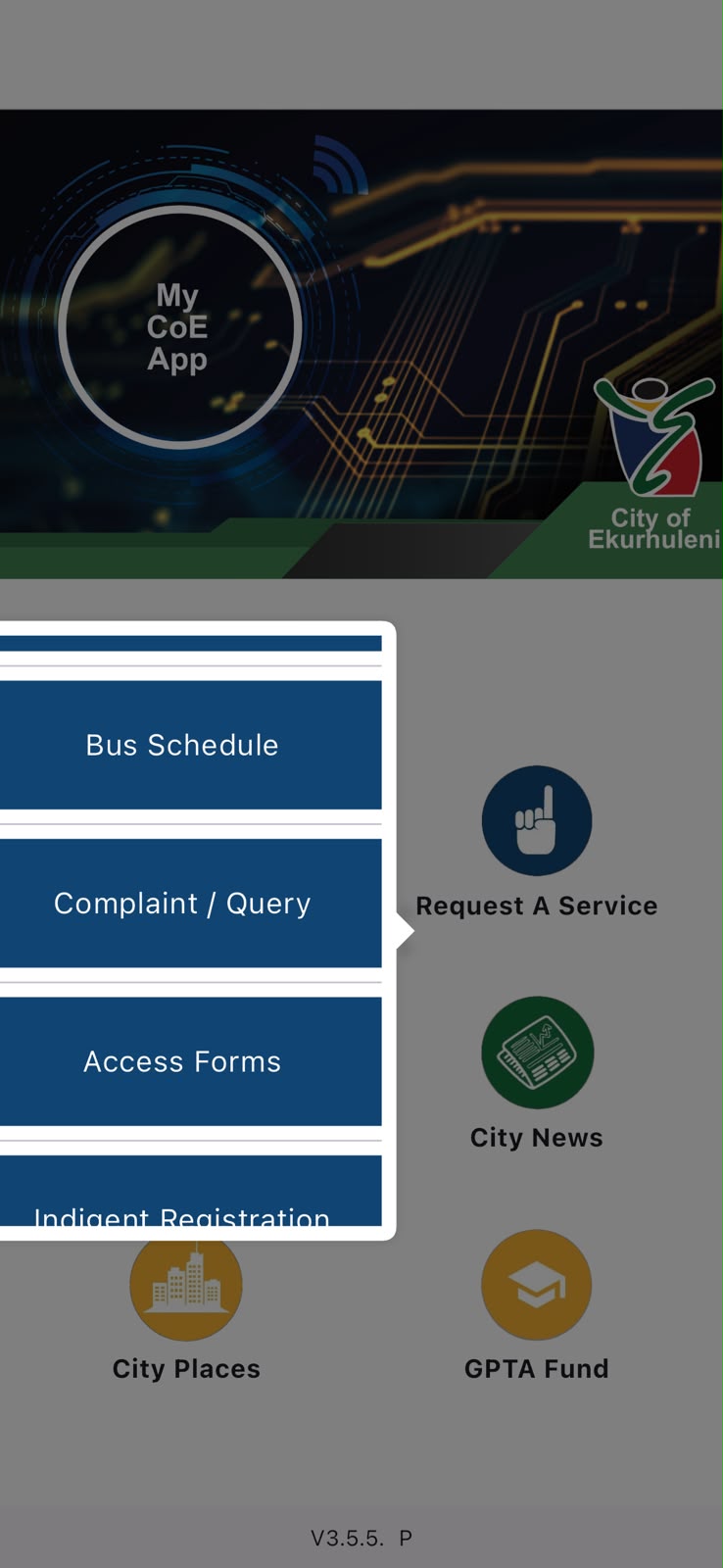
- Queries
- Complaints
- Compliments
- Requests
It also provides an option for logging a new query, complaint or compliment.
For a water outage, use the support-query process to report the problem.
Step 7: Select the appropriate query type
You will need to select a Query Type.
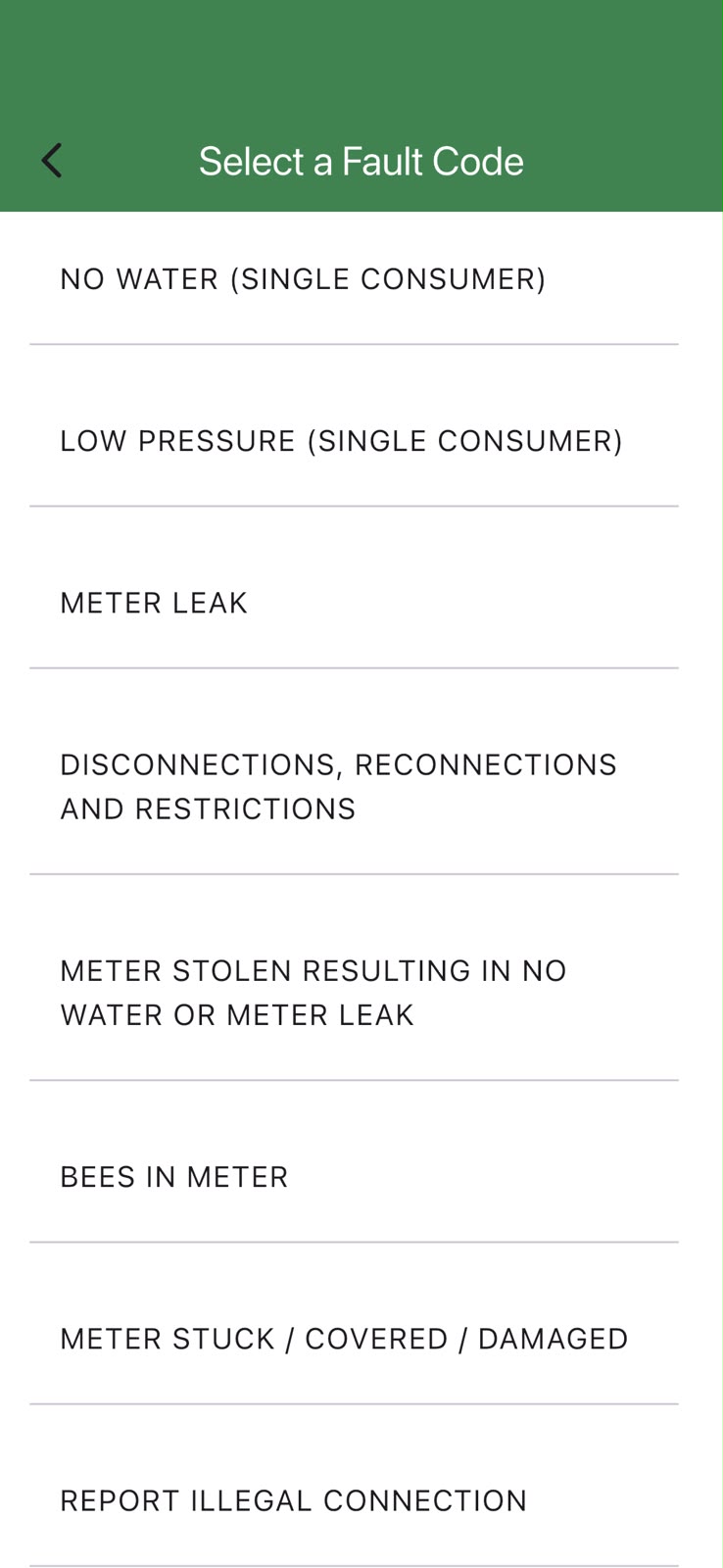
Choose the water-related option that best describes your problem.
For example, if the available option is for a water service problem or no water, select the option that matches your situation.
The exact options displayed may depend on the current Siyakhokha system.
Step 8: Add a description of the water outage
This is an important part of the process.
Use the description box to explain the problem clearly.
For example:
There has been no water at my property since approximately 06:00 today. Several properties in the area are also affected. My address is [your address]. The nearest intersection is [intersection]. Please investigate the water outage and provide an update.
Try to include:
- Your address
- Suburb
- Town
- Date the outage started
- Approximate time the outage started
- Whether neighbours are affected
- Whether there is completely no water
- Whether there is low water pressure
- Any other useful information
Avoid writing only:
“No water.”
A detailed description gives the City more information about the problem.
Step 9: Link your municipal account if required
If you have a municipal account linked to Siyakhokha, make sure you select the correct account.
The Siyakhokha user manual explains that users can link their municipal account when using the platform. It also states that when creating a support query, users who do not have an account to link can select the “I do not have an account” option.
If you have a municipal account, it is useful to have your account number available.
Step 10: Submit the support query
Before submitting the complaint, check your information carefully.
Make sure:
- Your address is correct.
- Your contact information is correct.
- You selected the correct query type.
- Your description clearly explains the problem.
- You included when the water stopped.
- You mentioned whether other properties are affected.
Then select Submit.
According to the Siyakhokha user manual, a message confirming that the query has been successfully lodged will appear after submission.
Step 11: Save your complaint details
After submitting your query, save the information relating to your complaint.
Take a screenshot if necessary.
Keep the details because they can be useful when you need to follow up.
The Siyakhokha platform also provides a section for viewing previous queries, complaints and compliments.
How to Report a Water Outage by Telephone
Step 12: Call the City of Ekurhuleni
If you do not want to use Siyakhokha, or if you are unable to access the website, you can report the outage to the City’s service call centre.
City of Ekurhuleni Service Call Centre
0860 543 000
The City currently lists 0860 543 000 as the service call centre number for service-related issues, including no water.
The City also lists:
Email: call.centre@ekurhuleni.gov.za
My CoE App
as service-reporting options.
Step 13: Tell the operator exactly what is wrong
When you speak to the operator, clearly explain that you are reporting a water outage.
You can say:
“I would like to report a water outage. There has been no water at my property since approximately 06:00 this morning.”
If several houses are affected, say so.
For example:
“There is no water in our street and several houses are affected.”
The City advises residents to explain the reason for the call and the type of help they need.
Step 14: Give your location
Give the operator your complete location.
Provide:
- Full name
- Contact number
- Street address
- Suburb
- Town
- Nearest crossroad
- Nearby landmark
For example:
“I live at 25 Example Street in Benoni. The nearest intersection is Example Street and Main Road, near the shopping centre.”
The City specifically asks residents to provide this type of information when logging service-related issues.
Step 15: Ask for a reference number
Do not end the call without getting a reference number.
The reference number is important because you can use it when following up on your complaint.
The City specifically advises residents to obtain a reference number and to get the name of the call-centre operator.
Save the reference number on your phone.
Step 16: Follow up on your complaint
If the water remains off, follow up with the City.
When following up, provide:
- Your reference number
- Your address
- The date you first reported the problem
- How long you have been without water
Explain that you are following up on an existing water outage.
If you originally reported the problem through Siyakhokha, keep the online complaint details available as well.
5. My Experience or Practical Insights
One of the best things you can do when reporting a municipal problem is keep a record.
Do not rely on memory.
Write down:
- Date you reported the outage
- Time you reported it
- Reference number
- Name of the call-centre operator
- Description of the problem
- Any information given to you
- Date and time of follow-up calls
If you use Siyakhokha, take a screenshot after submitting the complaint.
Check with neighbours
If several homes are without water, mention this when reporting the problem.
This helps show that the problem may be affecting an area rather than one property.
Take photographs of visible problems
If you see a burst pipe or water leak, take a photograph if it is safe to do so.
The City lists water leaks and leaking fire hydrants among the water and sewer problems residents can report.
Do not put yourself in danger to take a photograph.
6. Common Mistakes to Avoid
1. Not getting a reference number
Always ask for a reference number when reporting by telephone.
Keep your Siyakhokha complaint details when reporting online.
2. Giving an incomplete address
Do not only say:
“I live in Benoni.”
Give your street address, suburb, town and nearest landmark.
3. Not saying when the water stopped
Tell the City approximately when you first noticed the outage.
4. Assuming everyone has no water
Ask your neighbours if possible.
If only your property is affected, investigate whether there may be an internal plumbing problem.
5. Writing a very short Siyakhokha description
Do not simply write:
“No water.”
Instead, explain where the problem is, when it started and whether other properties are affected.
6. Forgetting to save your complaint information
Take a screenshot or save your reference details.
7. Not following up
If the water is still off, follow up using your reference number or complaint details.
8. Using unofficial information
Avoid relying only on community WhatsApp groups or social media posts.
Use official City channels for reporting and confirmation.
7. Troubleshooting
What if Siyakhokha will not let me log in?
Check that your username and password are correct.
The Siyakhokha login page also provides a Forgot Username and Password? option.
If you still cannot access your account, you can use another City reporting channel, such as the service call centre.
What if I do not have a Siyakhokha account?
Select Register on the Siyakhokha login page and follow the registration process.
Alternatively, report the outage by calling:
0860 543 000
What if my neighbours have water but I do not?
Check your:
- Main water valve
- Water meter
- Internal plumbing
- Pipes inside your property
If you cannot find the problem, you may need to contact a plumber or the municipality, depending on where the fault is.
What if the entire street has no water?
Report the problem to the City.
Tell the operator that several properties are affected.
If using Siyakhokha, clearly mention in the description that the outage affects your street or neighbourhood.
What if the water comes back but the pressure is very low?
Give the water system some time to return to normal.
If low pressure continues, report it to the City as a water service problem.
What if the water is dirty when it returns?
Do not assume that discoloured or bad-smelling water is safe to drink.
Report the problem to the City.
The City lists soiled or smelling water as a reportable water and sewer issue.
What if I see a burst pipe?
Report it as soon as possible.
Give the exact location of the burst pipe.
If it is on or near a busy road, stay away from dangerous areas and do not enter flowing water.
8. Helpful Tips and Best Practices
Save the City’s number
Save:
0860 543 000
on your phone.
This makes it easier to report future service problems.
Use Siyakhokha when you prefer online reporting
If you have a Siyakhokha account, you can use the Create a Support Query function to submit a complaint or query online.
Keep water for emergencies
If your area often experiences interruptions, keep a reasonable amount of clean water available for drinking, cooking and basic household use.
Report leaks
Do not ignore municipal water leaks.
A leaking pipe can waste a large amount of water.
Check official updates
Water outages can sometimes be caused by maintenance, infrastructure problems, power interruptions or other issues.
Use official City communication channels for updates rather than relying only on rumours.
Follow up politely
When following up, give your reference number and explain the situation clearly.
This makes it easier for the person assisting you to understand that you are following up on an existing complaint.
9. Frequently Asked Questions
1. What number do I call to report a water outage in Ekurhuleni?
Call the City of Ekurhuleni Service Call Centre on 0860 543 000. The City’s official reporting page lists “No water” as a service-related issue.
2. Can I report a water outage online?
Yes. Ekurhuleni provides several online reporting options, including Siyakhokha and the My CoE App. The City has also identified Siyakhokha as a platform for reporting service delivery interruptions.
3. How do I report a water outage on Siyakhokha?
Log in to Siyakhokha, go to My Dashboard, select Create a Support Query, choose the appropriate query type, describe the water problem and submit the query. The Siyakhokha manual confirms these steps for lodging a support query.
4. Do I need a municipal account to report a problem on Siyakhokha?
The Siyakhokha manual provides an “I do not have an account” option when creating a support query.
5. What information should I provide when reporting no water?
Provide your full name, contact number, address, suburb, town, nearest crossroad and nearby landmark. Also explain what happened and when the water stopped.
6. Do I get a reference number?
When reporting by telephone, the City advises residents to get a reference number for follow-up.
If you report online through Siyakhokha, keep the details confirming that your query was successfully lodged.
7. Can I report a burst water pipe?
Yes. Water leaks are included among the water and sewer problems that can be reported to the City.
8. Can I report dirty or bad-smelling water?
Yes. The City lists soiled/smelling water as a water and sewer service issue that residents can report.
9. What should I do if my water outage complaint is not resolved?
Keep your reference number or Siyakhokha complaint details and follow up with the City.
Explain that the water is still off and provide the original complaint information.
10. Can I report a water outage if I am a tenant?
Yes. A tenant can report a municipal service problem affecting the property or area. Have the property’s address and other location details ready.
10. Official Resources and References
City of Ekurhuleni – Report It
The City’s official Report It page provides information about reporting service-related problems, including no water, water leaks, faulty water meters, leaking fire hydrants and soiled or smelling water.
City of Ekurhuleni – Report It
Siyakhokha Login
Residents can access the Siyakhokha platform through the official login page.
Siyakhokha Login – City of Ekurhuleni
Siyakhokha User Manual
The official Siyakhokha user manual explains how to access the platform and how to create a support query. It confirms that users can go to My Dashboard → Create a Support Query, select a query type, add a description and submit the query.
Siyakhokha Customer User Manual
City of Ekurhuleni – Service Call Centre
Telephone: 0860 543 000
Email: call.centre@ekurhuleni.gov.za
The City confirms these channels for service-related problems.
11. Conclusion
Reporting a water outage in Ekurhuleni is easier when you know which official channel to use.
You can report no water to the City of Ekurhuleni through the service call centre, My CoE App, email and other official channels. You can also use Siyakhokha to submit a support query online.
If you want to use Siyakhokha, the basic process is:
- Open the Siyakhokha website.
- Register or log in.
- Go to My Dashboard.
- Select Request a Services then Create a Support Query.
- Select the appropriate query type.
- Describe the water outage.
- Select or link your municipal account where applicable.
- Submit the query.
- Save your complaint details.
- Follow up if the problem continues.
If you prefer to speak to someone, call 0860 543 000.
Most importantly, provide a clear address, explain when the outage started and keep your reference or complaint details. This will make it easier to follow up if the water remains off.
12. Disclaimer
This article is for general information and educational purposes only.
Municipal procedures, contact details, website features and reporting options can change. The Siyakhokha website may also be updated from time to time.
The information in this article is based on information available from the City of Ekurhuleni and the official Siyakhokha platform at the time of writing. Always check the official City website or Siyakhokha platform for the latest information.
HowToGuide.co.za is an independent website and is not affiliated with, sponsored by or endorsed by the City of Ekurhuleni.
For a normal water outage, use the City’s service-reporting channels. For a situation that is genuinely life-threatening, use the appropriate emergency services instead.

.
About Pheto M
Pheto M is the founder and guide writer of HowToGuide.co.za, a practical information website created to help people find clear, useful and easy-to-understand guidance on everyday topics.
Pheto started HowToGuide.co.za after noticing a common problem: people often need help with important questions, applications, services and everyday decisions, but the information available online can be confusing, difficult to understand or scattered across different sources.
Pheto has experience and knowledge across several areas, including Business, Information Technology (IT), Education and Relationships. These areas have given her a practical understanding of different challenges people face in their personal, professional and everyday lives.
Today, she dedicates her time to researching, writing and updating practical guides designed to help readers understand information and take the right steps with greater confidence.
Her approach is simple: make complex information simple, confusing processes clear, and difficult situations easier to manage.
Through HowToGuide.co.za, Pheto aims to provide practical, accessible and helpful information that readers can use in their everyday lives.
Pheto values feedback from readers and is committed to continually improving the content on HowToGuide.co.za. If you have a question, suggestion, or would like to get in touch, you can email her at admin@howtoguide.co.za. She personally reviews reader feedback and aims to respond within 48 hours.
How to Register a Customary Marriage in South Africa Before the 31 August 2026 Deadline
August 9, 2026
Reading Time: 11 minutesRegister your customary marriage in South Africa before the 31 August 2026 deadline. Learn about required documents, family witnesses, and Home Affairs steps.
How to Explain Colors to a Blind Person or Child (2026): A Sensory Guide
July 26, 2026
Reading Time: 5 minutesExplaining color to someone who is blind might sound impossible, but colors are far more than just visual—they are felt, heard, tasted, and experienced. Discover practical, sensory-rich ways to introduce color concepts to blind children or adults using everyday touch, temperature, emotion, and sound.
How to Change a Tire (Tyre) Safely: A Step-by-Step Guide for Beginners(2026).
July 23, 2026
Reading Time: 6 minutesLearn how to change a flat tire (tyre) safely with this easy, step-by-step guide for beginners. Discover the essential tools you need, clear instructions to replace your tire, common mistakes to avoid, and key safety tips for the road.
How to Stop Gambling and Save Money in 2026: A Practical Step-by-Step Guide
July 21, 2026
Reading Time: 6 minutesLearn how to stop gambling and protect your income. Explore step-by-step methods to calculate your true gambling costs, replace bad habits, and build a lasting savings plan.
Deep Questions to Ask Your Partner for a Stronger Relationship (2026)
July 14, 2026
Reading Time: 5 minutesEvery relationship reaches a point where everyday conversations are no longer enough. Strong, unshakable bonds aren’t built by accident—they are built through honest conversations, trust, and a willingness to hear difficult truths. This comprehensive guide features 10 sections of intentional, deep questions designed to help couples move past surface-level talk, explore emotional intimacy, and establish regular “love meetings” for lasting connectio
How to Deal With Grief: A Simple Step-by-Step Guide to Healing
July 10, 2026
Reading Time: 6 minutesLearn how to deal with grief with this simple, step-by-step guide. Discover practical coping tools, understand your emotions, and find your way to a new normal.
How to Pray: A Step-by-Step Biblical Guide for Beginners (2026
July 8, 2026
Reading Time: 7 minutesWhether you are new to prayer or looking to deepen your spiritual life, this comprehensive, step-by-step guide breaks down how to pray using Bible-recommended patterns. From preparing your heart and mastering the Lord’s Prayer to applying the practical ACTS method, discover actionable steps, situational prayers, and a 5-minute daily cheat sheet to help you build a consistent and meaningful conversation with God.