
If you applied for Limpopo Online Admissions 2027, the application period has now closed and the next important step is to check the status of your child’s application.
The Limpopo Department of Education’s online admissions portal closed applications on 31 August 2026. Parents and guardians who already registered and submitted an application can continue using the portal to check the progress of their application and monitor placement updates.
The official portal is:
Limpopo Online Admissions:
https://admissions.edu.limpopo.gov.za/
This guide explains how to check your Limpopo school admission status for 2027, what different application updates may mean, what to do if you cannot log in and what to do if you have not yet received a placement update.

1. Introduction
The Limpopo Department of Education uses an online admissions system to manage applications for learners entering public ordinary schools.
For the 2027 academic year, the online application system opened on 27 July 2026 and closed on 31 August 2026. The Department introduced the Online Learner Admissions System (OLAS) to make applications and learner placement more accessible and transparent.
Now that the application period has ended, parents and guardians should regularly check their application status.
The status check is important because submitting an application does not automatically mean that a learner has been accepted or placed at the selected school.
The official admissions portal states that applications can be tracked online and that parents can receive placement updates through the system.
Important
Applications for Limpopo Online Admissions 2027 closed on 31 August 2026.
If you already submitted an application, you should now focus on monitoring its progress and checking for placement information rather than submitting a new application.
2. Who This Guide Is For
This guide is mainly for parents and guardians who applied for a learner through the Limpopo Online Admissions 2027 system.
It can be useful if you applied for:
- Grade R
- Grade 1
- Grade 8
- A learner transferring to another public school where an online application was required
You can use this guide if you want to:
- Check your application status
- Check whether your application was successfully submitted
- Track the progress of your application
- Check for a placement update
- Find out what to do if you cannot log in
- Find out what to do if you have not received an SMS or email
- Contact the Limpopo Department of Education for assistance
3. Requirements
Before checking your application status, it is useful to have the information you used when registering.
You may need:
1. Your cellphone number
The cellphone number used during registration is important because the Limpopo admissions system uses it as the username for the parent/guardian account.
2. Your password
You will need the password created when you registered your parent or guardian account.
If you cannot remember your password, use the available login or password-reset options on the official portal.
3. Your learner’s information
Keep the learner’s details available in case you need to confirm which application you are checking.
4. Internet access
You can access the admissions portal using a cellphone, tablet or computer with an internet connection.
5. Your application information
If you saved or printed your application confirmation, keep it available. It can be useful if you need to contact the Department about your application.
4. Step-by-Step Guide: How to Check Limpopo Online Admission Status 2027
Checking your Limpopo school admission status should be done through the official Department of Education admissions portal.
Step 1: Open the official Limpopo admissions website
Go to:
Limpopo Online Admissions Portal
Be careful when searching for the website online because there may be unofficial websites providing information about Limpopo admissions.
Always check that you are using the official edu.limpopo.gov.za admissions website.
Step 2: Select “Login”
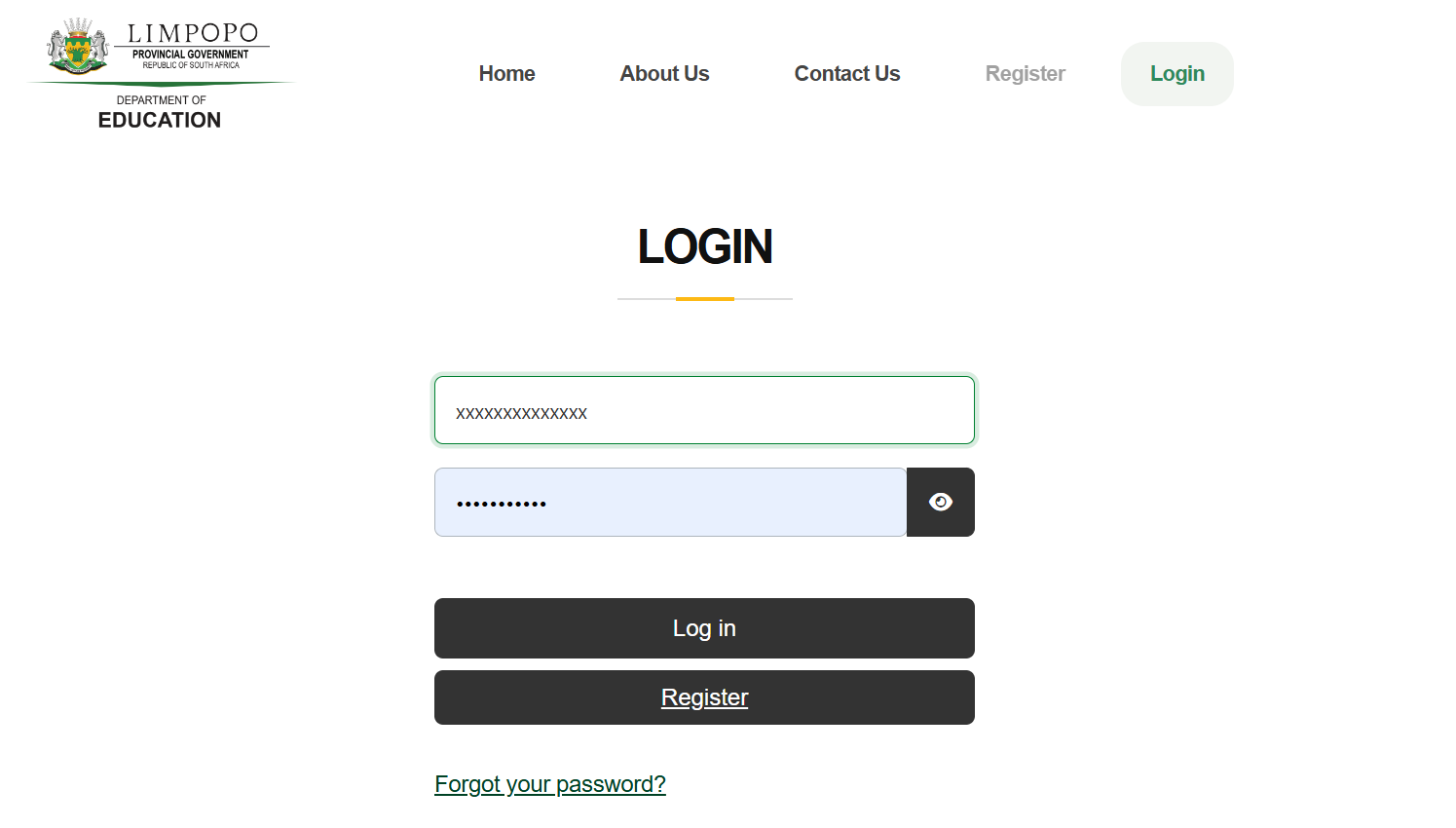
The admissions portal provides a Login option for parents and guardians who have already registered.
Since applications have closed, parents who already submitted applications should use their existing account rather than attempting to create a new application.
The official portal currently tells already registered applicants to log in to view the progress of their applications.
Step 3: Enter your login details
Enter the details associated with your parent/guardian account.
Your cellphone number was used as the username during the registration process.
Enter your password and proceed to log in.
Step 4: Open your application
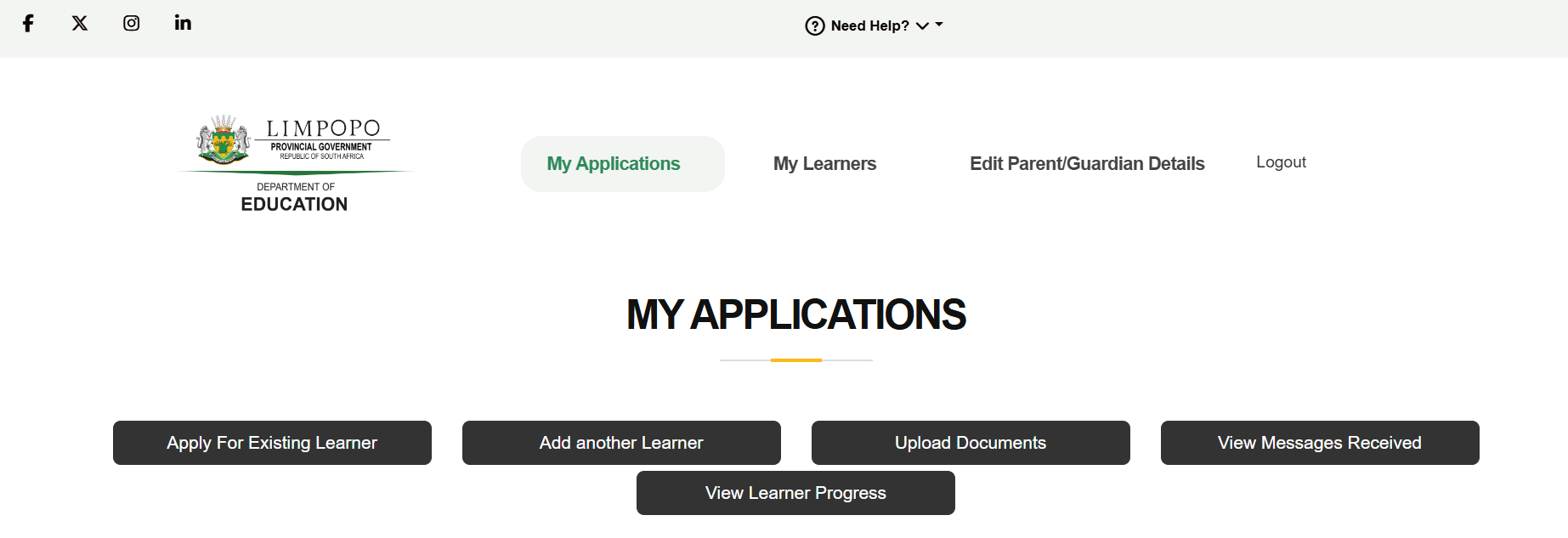
After logging in, look for your learner’s application.
The purpose of logging in after the application closing date is to monitor the progress of the application and any placement updates.
Step 5: Check the application progress
Review the information displayed on your account.
Depending on the stage of processing, your application may still be undergoing verification or placement processes.
Do not assume that an application is unsuccessful simply because a final placement message has not appeared yet.
Step 6: Check for placement information
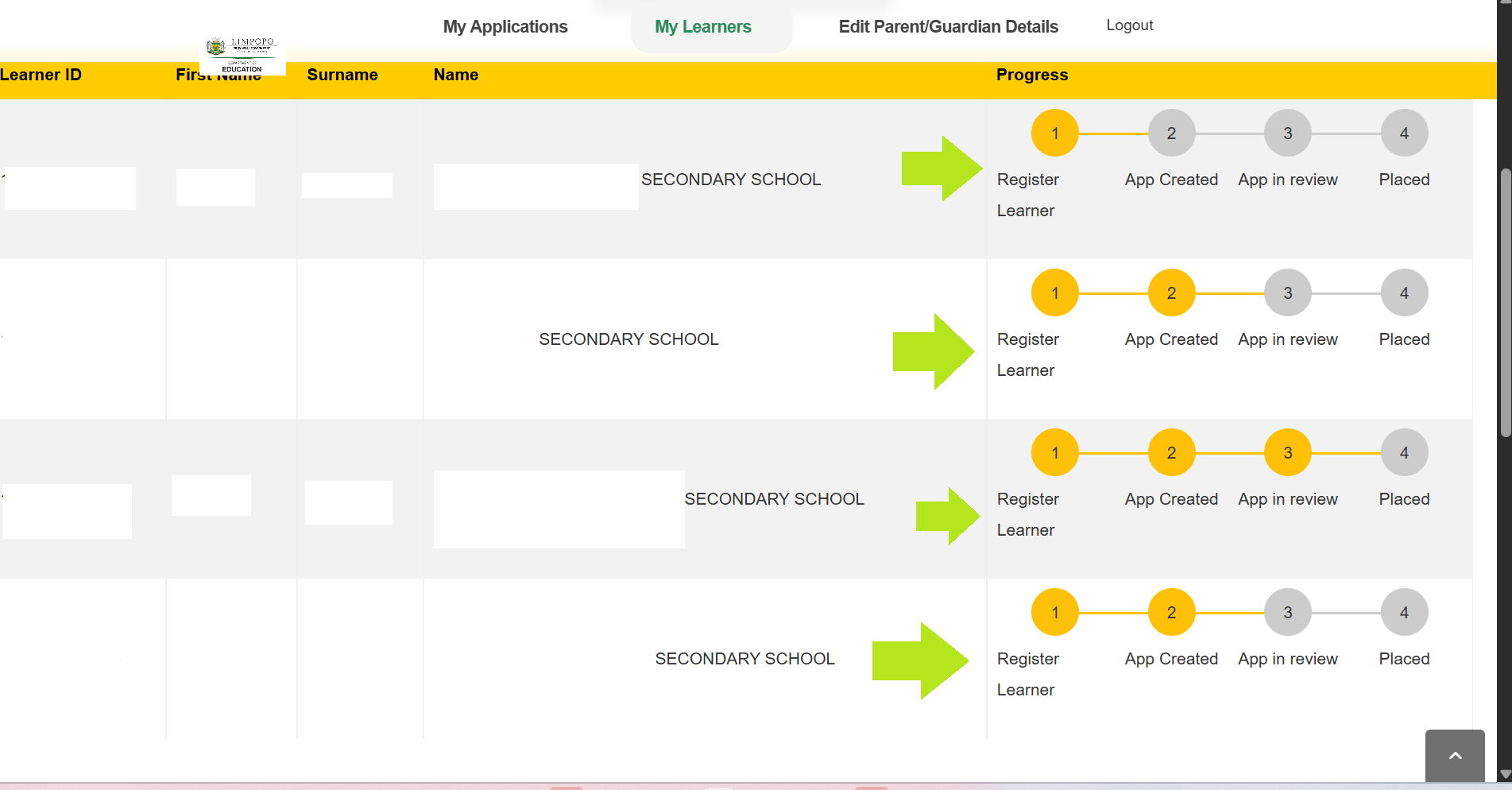
Parents should also look for any message indicating that the learner has been placed.
The Limpopo admissions portal states that parents can receive placement updates and track their applications through the system. (check green inserted arrow to see the application progress)
Step 7: Check your SMS and email
Do not rely only on the website.
The Limpopo admissions portal states that parents can receive updates through the portal as well as SMS or email notifications.
Therefore, check:
- Your cellphone SMS messages
- Your email inbox
- Your spam or junk email folder
- Your admissions portal account
Step 8: Save your placement information
If you receive a placement confirmation, save the information.
You can take a screenshot, download or print the confirmation if the option is available.
This can make it easier to refer back to the information when preparing for the 2027 school year.
5. My Experience or Practical Insights
One of the most important things parents should understand is that application submission and school placement are not the same thing.
Submitting an application means that the learner has been put forward for consideration. It does not automatically guarantee admission to the school selected.
The official Limpopo admissions registration information specifically states that submission of an application does not guarantee placement at the selected school. It also explains that information and documents are validated by an Admissions Committee.
My practical advice
After submitting an application, avoid checking the portal once and then forgetting about it.
Instead, make it a habit to check periodically.
For example:
Check your portal → Check SMS → Check email → Check again later if there is no final update.
This is especially important during the period when schools and the Department are processing applications and placements.
Another useful tip is to keep your original application information and documents somewhere safe.
If there is a problem with your application, having your information available can make it easier to explain your situation to the Department.
6. Common Mistakes to Avoid
Mistake 1: Assuming submission means acceptance
Submitting an application does not guarantee that the learner will be placed at the selected school.
Wait for an official placement outcome.
Mistake 2: Using unofficial websites
Always start with the official Limpopo Department of Education admissions website.
The official portal is:
Mistake 3: Creating another account unnecessarily
If you already registered and submitted an application, do not immediately create another account because you cannot see a placement.
First try to log into your existing account or contact the Department for assistance.
Mistake 4: Ignoring SMS messages
Some parents may only check the website.
However, the official portal says updates can also be sent by SMS or email.
Mistake 5: Checking only one school
If you selected multiple schools during the application process, check the information relating to all your applications.
The admissions portal encourages applicants to select multiple preferred schools to improve their chances of placement.
Mistake 6: Panicking when there is no final placement
A pending or incomplete-looking status does not necessarily mean rejection.
If the Department has not issued a final outcome, continue monitoring the official portal and communications.
7. Troubleshooting
I cannot log into the Limpopo admissions portal
First check that you are using the correct cellphone number and password.
If you forgot your password, look for the password-reset option on the official login page.
If the problem continues, contact the Limpopo Department of Education admissions support team.
The official contact details currently listed are:
Call Centre: 0800 202 611
Email: admissions@edu.limpopo.gov.za
The Department says its support team responds within 1–2 working days.
My application is not showing
If you submitted an application but cannot find it after logging into your account, do not immediately submit another application.
First check that you are using the same parent/guardian account used when the application was submitted.
If the application is still missing, contact the admissions support team.
I have not received an SMS
Not receiving an SMS immediately does not necessarily mean that your application was unsuccessful.
Check your application through the official portal and make sure the cellphone number and email address associated with your account are correct.
You can also contact the Department if you believe there is a problem.
I have not received a placement yet
Placement may take time because applications have to go through the Department’s processing and verification procedures.
Continue checking the portal and your messages for an official update.
If you are concerned about the delay, contact the Limpopo Department of Education directly.
The website is not working
If the website does not load:
- Check your internet connection.
- Try refreshing the page.
- Try another browser.
- Try using a cellphone instead of a computer, or vice versa.
- Try again later if the system is experiencing heavy traffic.
- Contact the admissions call centre if the problem continues.
8. Helpful Tips and Best Practices
Keep your cellphone number active
The cellphone number connected to your account is important for receiving communications.
Check your email regularly
Check both your normal inbox and your spam/junk folder.
Keep your documents safe
Keep copies of the documents submitted during the application process.
Take screenshots
When you see an important application update, consider taking a screenshot for your records.
Use the official website
Do not provide your personal information to unofficial websites claiming to check your Limpopo admission status.
Check regularly
There is no need to check every few minutes. Checking periodically is more practical.
Do not pay someone to check your status
The official admissions portal provides access to the application system. Be cautious of anyone asking for money simply to check your application status.
Contact the Department when necessary
If your application cannot be found, you cannot access your account or there is a problem with your learner’s information, contact the official admissions support team.
9. Frequently Asked Questions
1. When did Limpopo Online Admissions 2027 close?
The Limpopo Online Admissions 2027 application period closed on 31 August 2026. The Department’s official admissions portal confirms that early applications closed on this date.
2. Can I still check my Limpopo admission status after applications close?
Yes. Parents and guardians who have already registered can log into the admissions portal to view the progress of their applications.
3. Where can I check my Limpopo school admission status?
Use the official Limpopo Online Admissions portal:
https://admissions.edu.limpopo.gov.za
4. Does submitting an application guarantee placement?
No. Submission of an application does not guarantee placement at the selected school. The Department also validates information and documentation submitted by applicants.
5. How will I know if my child has been placed?
You should monitor your application through the admissions portal and check SMS and email notifications. The official portal states that placement updates can be provided through these channels.
6. What if I forgot my Limpopo admissions password?
Use the login/password-reset facilities provided on the official admissions portal. If you continue experiencing problems, contact the admissions call centre.
7. What is the Limpopo admissions call centre number?
The official portal currently lists 0800 202 611 as the admissions call centre number.
8. What is the Limpopo admissions email address?
The official contact page lists admissions@edu.limpopo.gov.za for admissions support.
9. What if I applied to more than one school?
Check the applications associated with your account. The admissions portal allows parents to select multiple preferred schools, which can improve the chances of placement.
10. What should I do if I cannot find my application?
First make sure you are logging into the correct parent/guardian account. If the application is still not visible, contact the Limpopo Department of Education admissions support team for assistance.
10. Official Resources and References
Limpopo Online Admissions Portal
This is the main website to use for logging in and checking the progress of an existing application:
Limpopo Department of Education
The Department’s website provides information about education programmes, policies, announcements and the online learner admission and placement system.
Limpopo Department of Education
Admissions Contact Centre
Telephone: 0800 202 611
Email: admissions@edu.limpopo.gov.za
The official contact page states that the support team assists with registering, applying to schools and tracking learner applications.
11. Conclusion
The Limpopo Online Admissions 2027 application period closed on 31 August 2026, but the admissions process does not end when the application window closes.
If you submitted an application, the next step is to monitor the progress of your application and wait for the placement outcome.
Parents and guardians can log into the official Limpopo Online Admissions portal to check their application progress and should also monitor their SMS and email for placement updates.
Remember that submitting an application does not automatically guarantee placement at your preferred school.
If you experience problems with your account, cannot find your application or need clarification about your child’s placement, contact the Limpopo Department of Education directly on 0800 202 611 or email admissions@edu.limpopo.gov.za.
For the safest and most accurate information, always use the official Limpopo Department of Education admissions portal.
12. Disclaimer
This article is intended for general informational purposes and is designed to help parents and guardians understand how to check their Limpopo Online Admissions 2027 application status.
HowToGuide.co.za is not affiliated with the Limpopo Department of Education unless expressly stated otherwise.
Admissions dates, procedures, placement processes, portal features and contact details may change. Always confirm important information directly with the official Limpopo Department of Education or the official admissions portal.
Do not share your password, OTP, banking information or other sensitive personal information with unofficial individuals or websites claiming to provide admissions assistance.
For the latest information, use the official Limpopo Online Admissions portal and the Limpopo Department of Education’s official communication channels.

.
About Pheto M
Pheto M is the founder and guide writer of HowToGuide.co.za, a practical information website created to help people find clear, useful and easy-to-understand guidance on everyday topics.
Pheto started HowToGuide.co.za after noticing a common problem: people often need help with important questions, applications, services and everyday decisions, but the information available online can be confusing, difficult to understand or scattered across different sources.
Pheto has experience and knowledge across several areas, including Business, Information Technology (IT), Education and Relationships. These areas have given her a practical understanding of different challenges people face in their personal, professional and everyday lives.
Today, she dedicates her time to researching, writing and updating practical guides designed to help readers understand information and take the right steps with greater confidence.
Her approach is simple: make complex information simple, confusing processes clear, and difficult situations easier to manage.
Through HowToGuide.co.za, Pheto aims to provide practical, accessible and helpful information that readers can use in their everyday lives.
Pheto values feedback from readers and is committed to continually improving the content on HowToGuide.co.za. If you have a question, suggestion, or would like to get in touch, you can email her at admin@howtoguide.co.za. She personally reviews reader feedback and aims to respond within 48 hours.
National Treasury Bursary Scheme 2027: How to Apply,Requirements & Closing Date (30 September 2026)
July 12, 2026
Reading Time: 6 minutesApply for the National Treasury Bursary scheme 2027. Learn the requirements,required documents,benefits,application process, and closing date of 30 September 2026.
Limpopo Traffic Learner Officer Learnership 2026: 204 Posts Available: Closed
July 12, 2026
Reading Time: 5 minutesLooking for a career in law enforcement? Apply for the Limpopo Traffic Learner Officer Learnership 2026. Step-by-step guide on requirements, stipend, and online application.
How to Register on the Limpopo e-Recruitment Portal: A Simple Step-by-Step Guide
July 10, 2026
Reading Time: 5 minutesLooking for a government job in Limpopo? Follow our simple, step-by-step guide to successfully register on the Limpopo e-Recruitment portal and apply online.
How to Find a Job in South Africa (2026).
July 9, 2026
Reading Time: 6 minutesFinding work in South Africa’s competitive market requires a strategic approach. Discover the top job platforms, learn how to successfully navigate hidden company career portals, explore the four distinct pathways to employment, and find crucial tips to protect yourself from common job scams.
How to Register on the Central Supplier Database (CSD) in South Africa (2026): A Simple Step-by-Step Guide
July 9, 2026
Reading Time: 7 minutesWant to do business with the South African government? Your first step is registering on the Central Supplier Database (CSD). This complete, step-by-step guide breaks down exactly what documents you need, how to navigate the registration process, and how to keep your supplier profile active and compliant.
How to Register for a Driving Licence in South Africa: A Simple Step-by-Step Guide
July 9, 2026
Reading Time: 5 minutesWant to get your driver’s licence in South Africa but don’t know where to start? From booking your learner’s test online to mastering the K53 yard and road tests, this simple, step-by-step guide breaks down everything you need to know—including documents, current 2026 costs, and practical tips to help you pass on your first try!
How to Apply to a University in South Africa (2026 Guide)
July 7, 2026
Reading Time: 7 minutesPlanning to study at a South African university in 2027 but don’t know where to start? From checking your APS score and gathering certified documents to tracking your application portal, this comprehensive, step-by-step guide breaks down how to apply to any public university—including key deadlines and the latest 2026/2027 national university rankings.
“How to Apply for NSFAS 2026 TVET Semester 2 (Deadline 17 July 2026)”
July 5, 2026
Reading Time: 5 minutesMissed out on funding? The NSFAS 2026 TVET Semester 2 applications are now open until 17 July 2026. Follow our step-by-step guide to check your eligibility, prepare your certified documents, and submit a flawless application.