
Introduction
FNB eWallet has become one of South Africa’s most popular digital money transfer services, allowing FNB customers to send money instantly to anyone with a valid South African cellphone number—even if the recipient does not have a bank account. It is widely used to send money to family members, domestic workers, contractors, students, and anyone who needs quick access to cash.
Although the service is fast and convenient, mistakes can happen. You might accidentally enter the wrong cellphone number, send the wrong amount, or realise moments later that you paid the wrong person. When this happens, the first question most people ask is, “Can I reverse an FNB eWallet payment?”
The answer depends on the status of the transaction. If the recipient has not yet redeemed or withdrawn the money, you may be able to reverse or cancel the eWallet through the FNB App or with assistance from FNB. However, if the money has already been withdrawn or spent, reversing the transaction is generally no longer possible.
This guide explains when an FNB eWallet payment can be reversed, how to check the status of your transaction, how to attempt a reversal using the FNB App, and what to do if the cancellation option is no longer available.
Who This Guide Is For
This guide is suitable for:
- FNB customers who accidentally sent an eWallet to the wrong cellphone number.
- Anyone who entered the wrong payment amount.
- Users who want to cancel an eWallet before it is redeemed.
- First-time users of the FNB App.
- South African residents using the FNB eWallet service.
- Individuals looking to understand how eWallet reversals work before sending money.
Requirements
Before attempting to reverse an FNB eWallet payment, make sure you have the following:
- An active FNB bank account.
- The latest version of the FNB App installed on your smartphone.
- A stable internet connection.
- Your FNB App login credentials (password, PIN, or biometric authentication).
- The cellphone used to access your banking profile.
- The transaction details, including the recipient’s cellphone number, amount sent, and payment reference.
Most importantly, the eWallet should ideally not yet have been redeemed. Once the recipient has withdrawn or spent the funds, a reversal is generally no longer possible.
Step-by-Step Guide
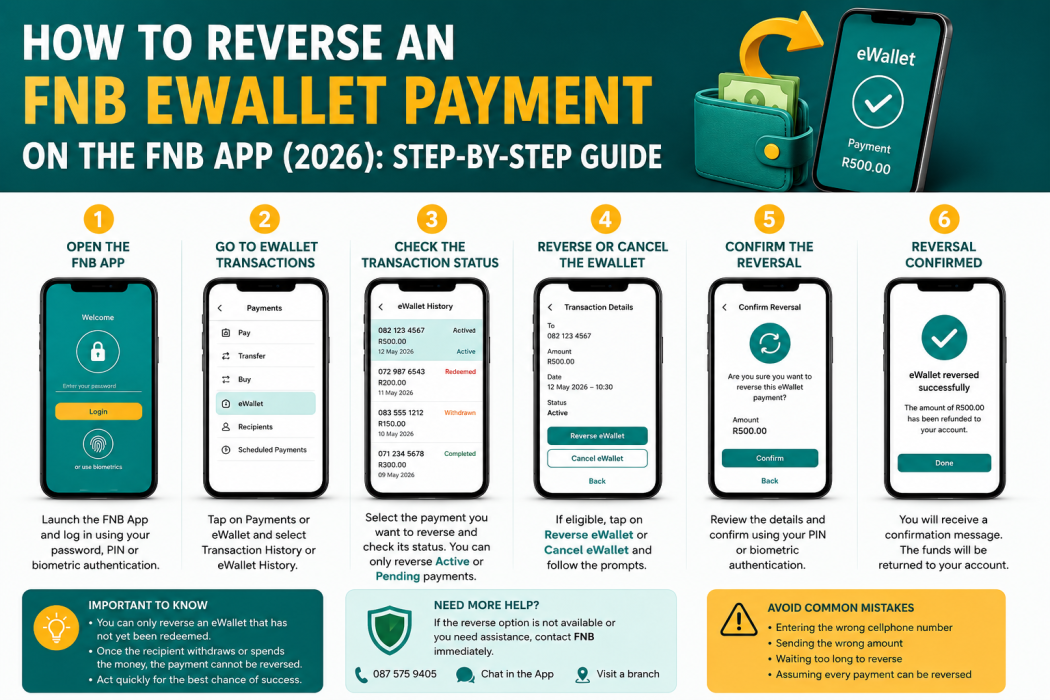
Step 1: Open the FNB App
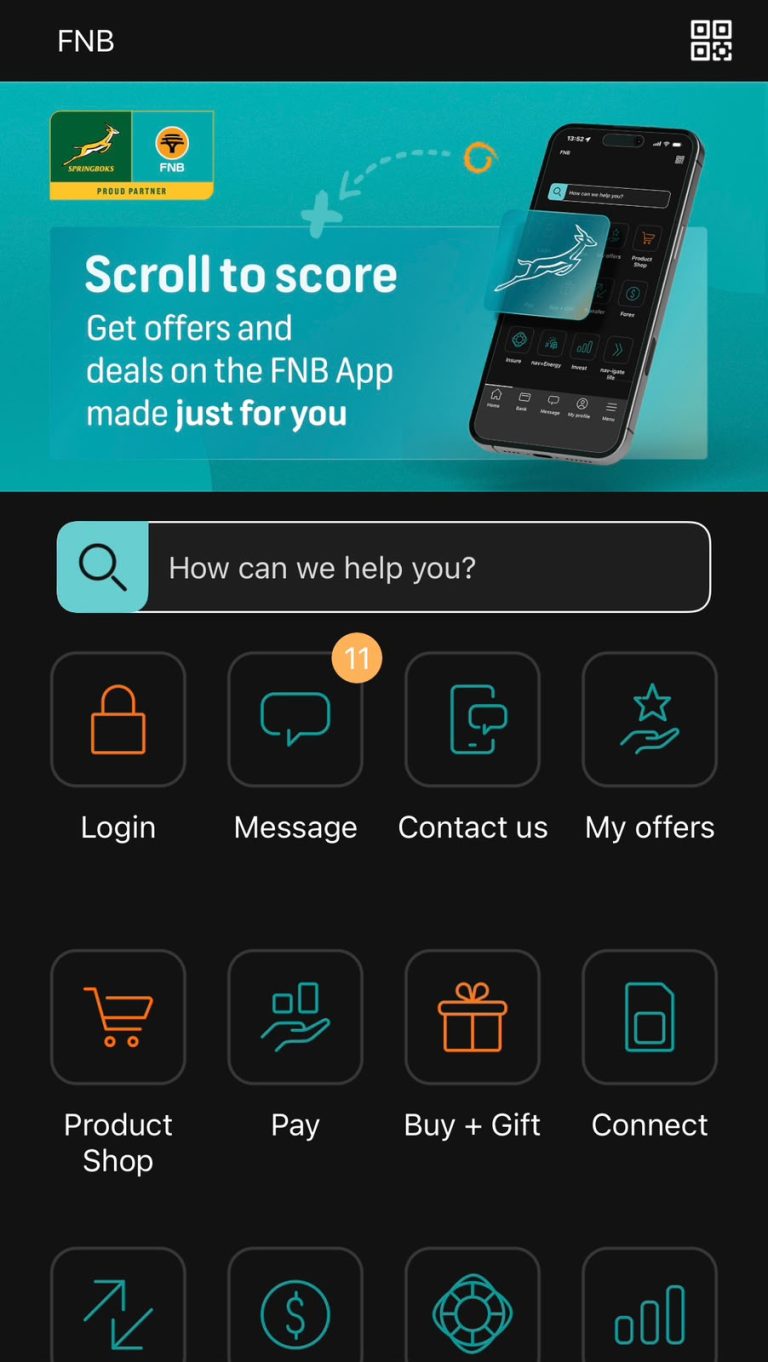
Launch the FNB App on your smartphone and sign in using your preferred authentication method. Wait for the home screen to load completely before navigating to your transactions.
Step 2: Go to Your eWallet Transactions
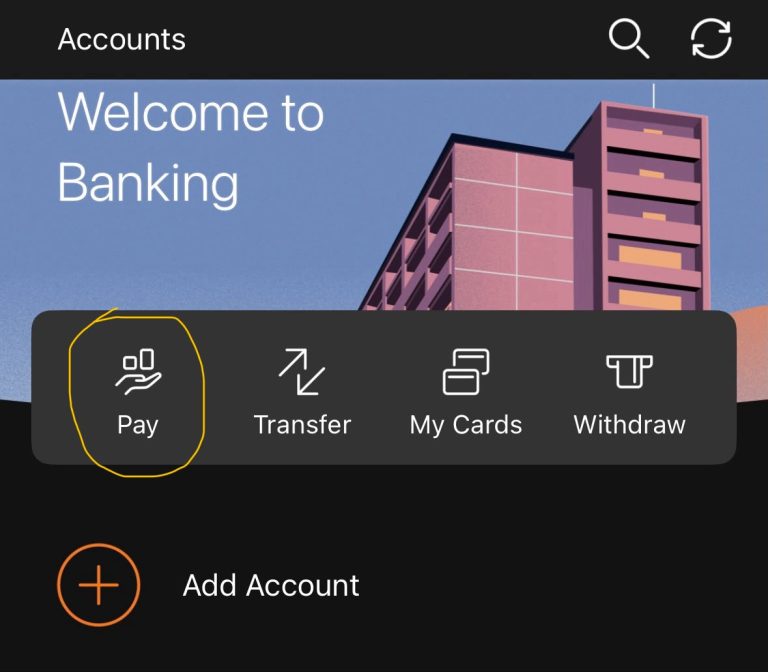
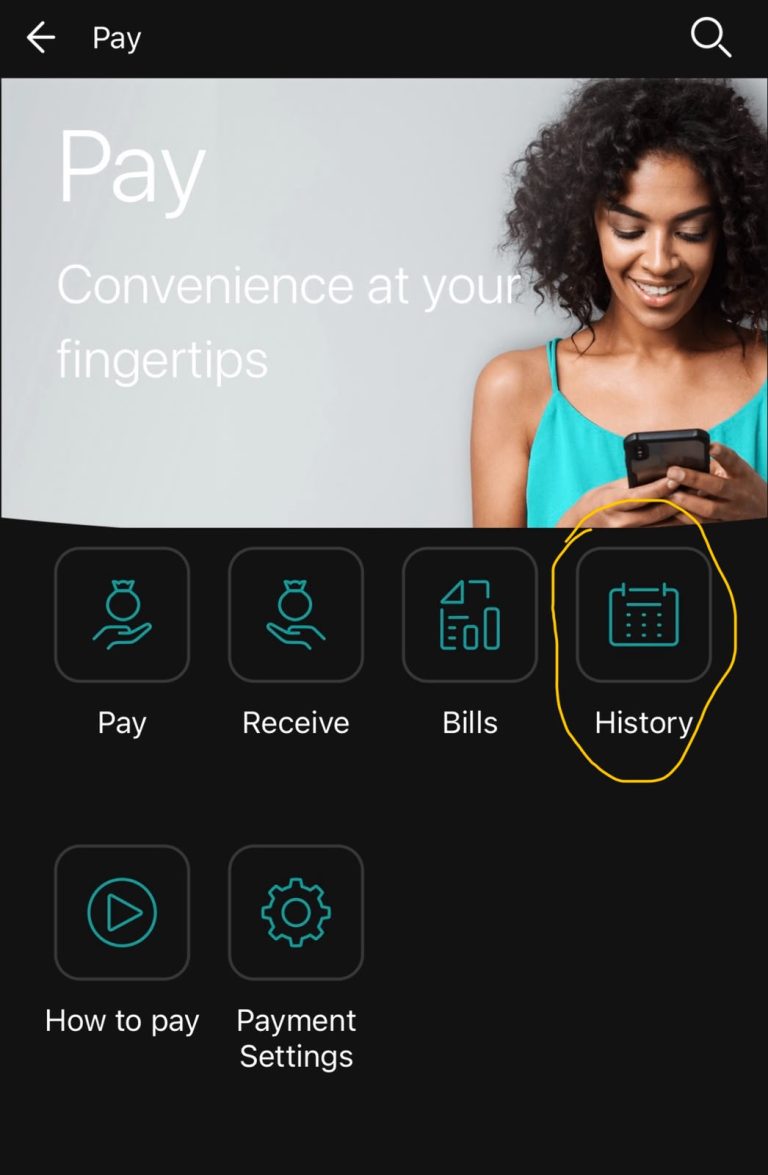
From the home screen, open the Pay or eWallet section, depending on your version of the app.
Select Transaction History or eWallet History and locate the payment you wish to reverse.
Check the transaction details carefully to make sure you have selected the correct payment.
Step 3: Check the Transaction Status
Open the transaction and review its current status.
Possible statuses may include:
- Pending
- Active
- Redeemed
- Withdrawn
- Completed
If the payment has already been redeemed or withdrawn, the reversal option will usually no longer be available.
Step 4: Reverse or Cancel the eWallet
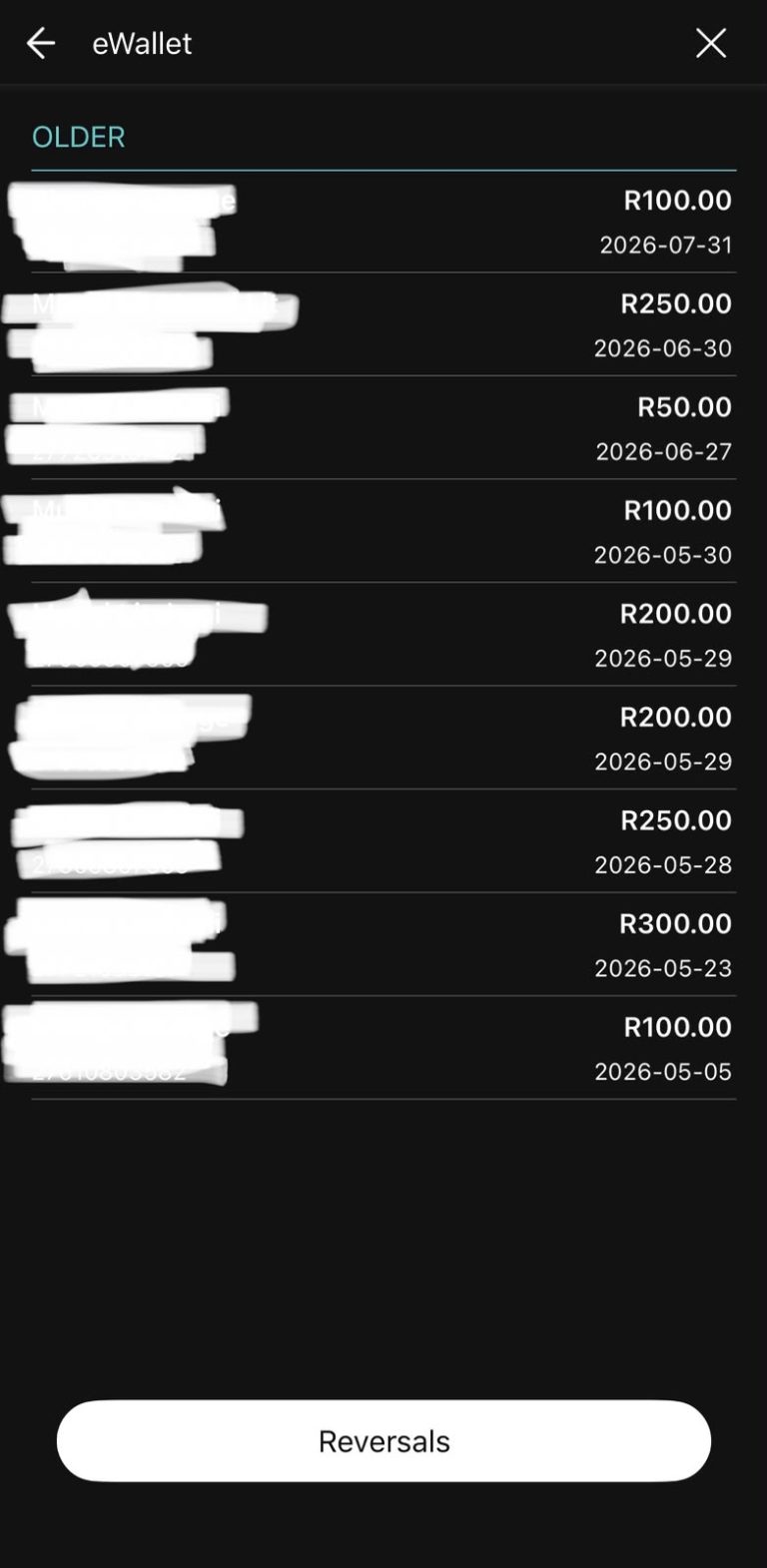
If the transaction is still eligible, look for an option such as Reverse, Cancel, or Cancel eWallet.
Follow the prompts to confirm the cancellation.
Depending on your security settings, the app may ask you to enter your banking PIN or use biometric verification.
Step 5: Confirm the Reversal
Once the request has been submitted, wait for the app to process the reversal.
If successful:
- The eWallet will be cancelled.
- The recipient will no longer be able to redeem the money.
- The funds will be returned to your account at a fee according to FNB’s processing procedures.
Save the confirmation message or take a screenshot for your records.
Step 6: Contact FNB If You Cannot Reverse the Payment
If the reversal option is unavailable or the transaction has already been redeemed, contact FNB immediately.
Have the following information ready:
- Your account number.
- Recipient’s cellphone number.
- Transaction reference.
- Date and time of the payment.
- Amount sent.
An FNB consultant can confirm whether any further action is possible.
My Experience and Practical Insights
After reviewing how South Africans use FNB eWallet, one lesson stands out: prevention is far easier than trying to recover money after it has been sent.
Most accidental payments happen because users rush through the transaction and do not double-check the recipient’s cellphone number or the amount before confirming the payment. Taking just a few extra seconds to verify these details can prevent unnecessary stress and financial loss.
If you realise you’ve made a mistake, act immediately. The sooner you open the FNB App and check the transaction status, the greater the chance that the recipient has not yet redeemed the funds. Once an eWallet has been withdrawn or spent, reversing the payment becomes significantly more difficult and may no longer be possible.
It is also a good habit to enable transaction notifications and keep copies of your payment confirmations. These records can be useful if you need to discuss the transaction with FNB or provide proof of payment.
Common Mistakes to Avoid
Avoid these common mistakes when sending or attempting to reverse an FNB eWallet payment:
- Entering the wrong cellphone number.
- Sending the incorrect amount.
- Assuming every eWallet payment can be reversed.
- Waiting too long before attempting a cancellation.
- Ignoring transaction confirmation messages.
- Deleting payment references before confirming the recipient has received the money.
- Sharing your FNB App PIN or password with anyone.
- Falling victim to scammers who claim they can reverse eWallet payments for a fee.
Troubleshooting
I cannot find the eWallet transaction.
Refresh your transaction history, ensure you are viewing the correct account, and check your recent payments.
The reverse option is not available.
The payment may already have been redeemed or may not qualify for cancellation. Contact FNB for assistance.
The FNB App is not working.
Check your internet connection, update the app to the latest version, or try again later if there is a temporary service interruption.
I sent money to the wrong cellphone number.
Attempt to reverse the payment immediately if the option is available. If not, contact FNB as soon as possible.
The money has not been refunded.
If the reversal was successful but the funds have not yet reflected in your account, allow time for processing. If the delay continues, contact FNB with your transaction reference.
Helpful Tips and Best Practices
- Always verify the recipient’s cellphone number before sending money.
- Double-check the payment amount before confirming the transaction.
- Save every transaction confirmation and reference number.
- Enable notifications in the FNB App to monitor payments.
- Attempt a reversal as soon as you notice a mistake.
- Keep the FNB App updated to the latest version.
- Never share your banking credentials with anyone.
- Contact FNB immediately if you believe a payment was sent in error.
Frequently Asked Questions
1. Can I reverse an FNB eWallet payment?
Yes, but only if the eWallet has not yet been redeemed or withdrawn. Once the funds have been accessed by the recipient, the payment is generally final.
2. How quickly should I attempt a reversal?
Immediately. Acting as soon as you notice the mistake gives you the best chance of successfully cancelling the payment.
3. Can I reverse an eWallet after the recipient has withdrawn the money?
In most cases, no. Once the funds have been redeemed or withdrawn, they generally cannot be reversed.
4. Is there a fee for reversing an eWallet?
FNB’s fees and charges may change over time. Refer to the latest FNB Pricing Guide or contact the bank for current information.
5. What information do I need when contacting FNB?
Have your account details, the recipient’s cellphone number, the transaction reference, the amount sent, and the payment date available.
6. Will the recipient know if I reverse the payment?
If the reversal is successful before the money is redeemed, the recipient will no longer be able to access the eWallet.
7. Can someone without an FNB account receive an eWallet?
Yes. FNB eWallet is specifically designed so that recipients do not need an FNB bank account to receive money.
8. How can I avoid sending money to the wrong person?
Always verify the cellphone number, recipient’s details, and payment amount before confirming the transaction.
Official Resources and References
For the most up-to-date information, refer to:
- First National Bank (FNB)
- FNB App Help Centre
- FNB Contact Centre
- FNB Pricing Guide
- Your nearest FNB branch
Conclusion
FNB eWallet is a fast and convenient way to send money across South Africa, but because transactions are designed to provide quick access to funds, they are often difficult or impossible to reverse once the recipient has redeemed them. If you make a mistake, your best chance of recovering the money is to act immediately by checking the transaction status and using the cancellation option if it is available.
By taking a few moments to verify the recipient’s cellphone number, confirming the amount, and keeping your transaction records, you can reduce the risk of errors and use FNB eWallet with greater confidence.
Disclaimer
Disclaimer: This guide is for informational purposes only. It is based on official FNB information, publicly available resources, and practical experience. FNB may change its procedures, fees, and app functionality without notice. The availability of an eWallet reversal depends on the transaction status and FNB’s current policies. Always verify the latest information directly with FNB before relying on this guide.

.
About Pheto M
Pheto M is the founder and guide writer of HowToGuide.co.za, a practical information website created to help people find clear, useful and easy-to-understand guidance on everyday topics.
Pheto started HowToGuide.co.za after noticing a common problem: people often need help with important questions, applications, services and everyday decisions, but the information available online can be confusing, difficult to understand or scattered across different sources.
Pheto has experience and knowledge across several areas, including Business, Information Technology (IT), Education and Relationships. These areas have given her a practical understanding of different challenges people face in their personal, professional and everyday lives.
Today, she dedicates her time to researching, writing and updating practical guides designed to help readers understand information and take the right steps with greater confidence.
Her approach is simple: make complex information simple, confusing processes clear, and difficult situations easier to manage.
Through HowToGuide.co.za, Pheto aims to provide practical, accessible and helpful information that readers can use in their everyday lives.
Pheto values feedback from readers and is committed to continually improving the content on HowToGuide.co.za. If you have a question, suggestion, or would like to get in touch, you can email her at admin@howtoguide.co.za. She personally reviews reader feedback and aims to respond within 48 hours.
How to Check If Someone Is Trying to Hack Your WhatsApp: 2026
August 21, 2026
Reading Time: 10 minutesLearn how to check if someone is trying to hack your WhatsApp. Discover key warning signs, like unexpected verification codes and unfamiliar linked devices, and follow simple steps to secure your account.
How to Use SARS WhatsApp Tax Services in 2026: Step-by-Step Guide
August 8, 2026
Reading Time: 12 minutesLearn how to access SARS tax services on WhatsApp in 2026. Step-by-step guide to check tax numbers, refund status, auto-assessments, and submit documents.
How to Reverse an FNB eWallet Payment on the FNB App (2026)
August 4, 2026
Reading Time: 6 minutesLearn how to reverse an FNB eWallet payment step-by-step using the FNB App, check transaction status, and act fast before funds are redeemed.
How to Cancel a FOX One Subscription on Roku or Youtube (2026): Easy Step-by-Step Guide.
July 26, 2026
Reading Time: 5 minutesNeed to cancel your FOX One subscription? Whether you signed up through Roku, YouTube, or directly, learn the exact step-by-step process to cancel your account, avoid unwanted auto-renewals, and manage your billing hassle-free.
How to Cancel Vodacom Subscriptions (Caller Tunes, Games & Contracts – 2026 Guide)
July 20, 2026
Reading Time: 5 minutesCharged for unknown airtime services? Learn how to cancel subscriptions on Vodacom step-by-step—including WASP content, caller tunes, recurring data bundles, and full contracts
How to Recall an Email in Outlook (2026 Step-by-Step Guide)
July 20, 2026
Reading Time: 6 minutesNeed to unsend an email in Outlook? Here is a step-by-step guide on how to recall an email, when the feature actually works, and what to do if it fails.