
Introduction
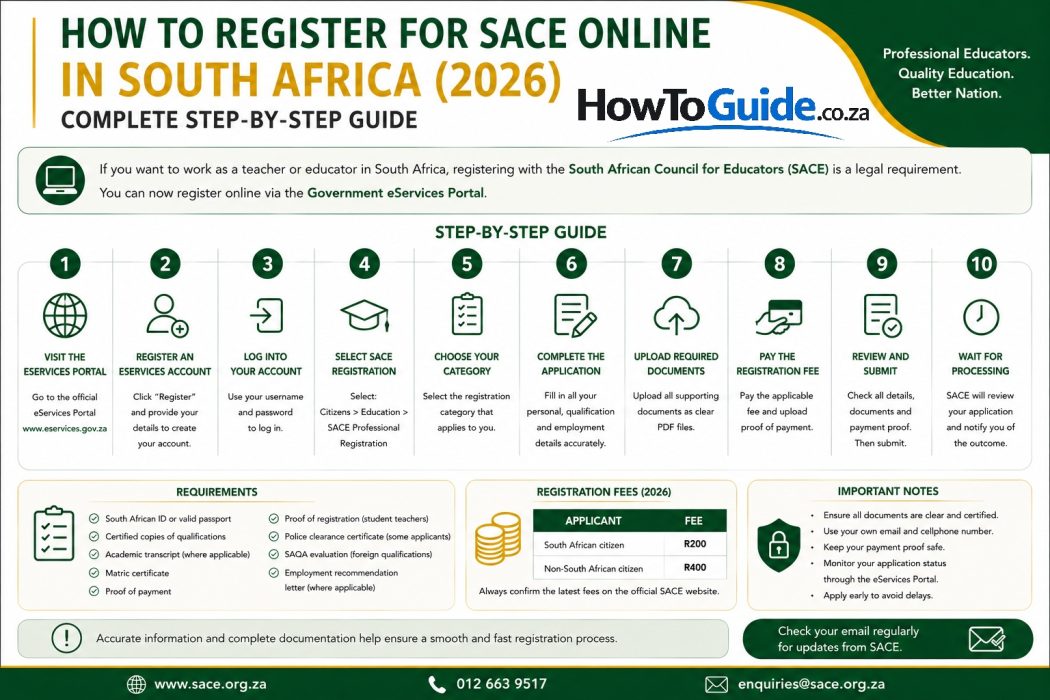
If you want to work as a teacher or educator in South Africa, registering with the South African Council for Educators (SACE) is a legal requirement. Whether you’re a newly qualified teacher, a student teacher, an Early Childhood Development (ECD) practitioner, a TVET lecturer, or an educator trained outside South Africa, you must register with South African Council for Educators before you can be employed in most teaching positions
Fortunately, SACE now allows first-time applicants to register online through the South African Government eServices portal, making the process much faster than traditional paper applications.
This guide explains everything you need to know about registering for SACE in 2026, including:
- Who needs SACE registration
- Eligibility requirements
- Required documents
- How to register online step by step
- Registration fees
- Common mistakes to avoid
- Troubleshooting tips
- Frequently asked questions
Who This Guide Is For
This guide is suitable if you are:
- A newly qualified teacher
- A student teacher studying towards a teaching qualification
- An unemployed graduate applying for teaching posts
- A qualified educator renewing or updating registration
- A TVET lecturer
- An ECD practitioner
- An Adult Education and Training (AET) educator
- A foreign-qualified teacher wanting to teach in South Africa
- A school requiring SACE registration before employment
Requirements
Before starting your application, make sure you have all your documents ready.
The exact documents depend on your category, but most applicants will need:
- South African ID (or valid passport for non-SA citizens)
- Certified copy of your qualification(s)
- Academic transcript where applicable
- Matric certificate
- Proof of payment of the registration fee
- Proof of registration (student teachers)
- Police clearance certificate (certain applicants)
- SAQA evaluation (foreign qualifications)
- Employment recommendation letter (where applicable)
Registration Fees
Current registration fees generally include:
| Applicant | Fee |
|---|---|
| South African citizen | R200 |
| Non-South African citizen | R400 |
Always confirm the latest fees before making payment.
Step-by-Step Guide
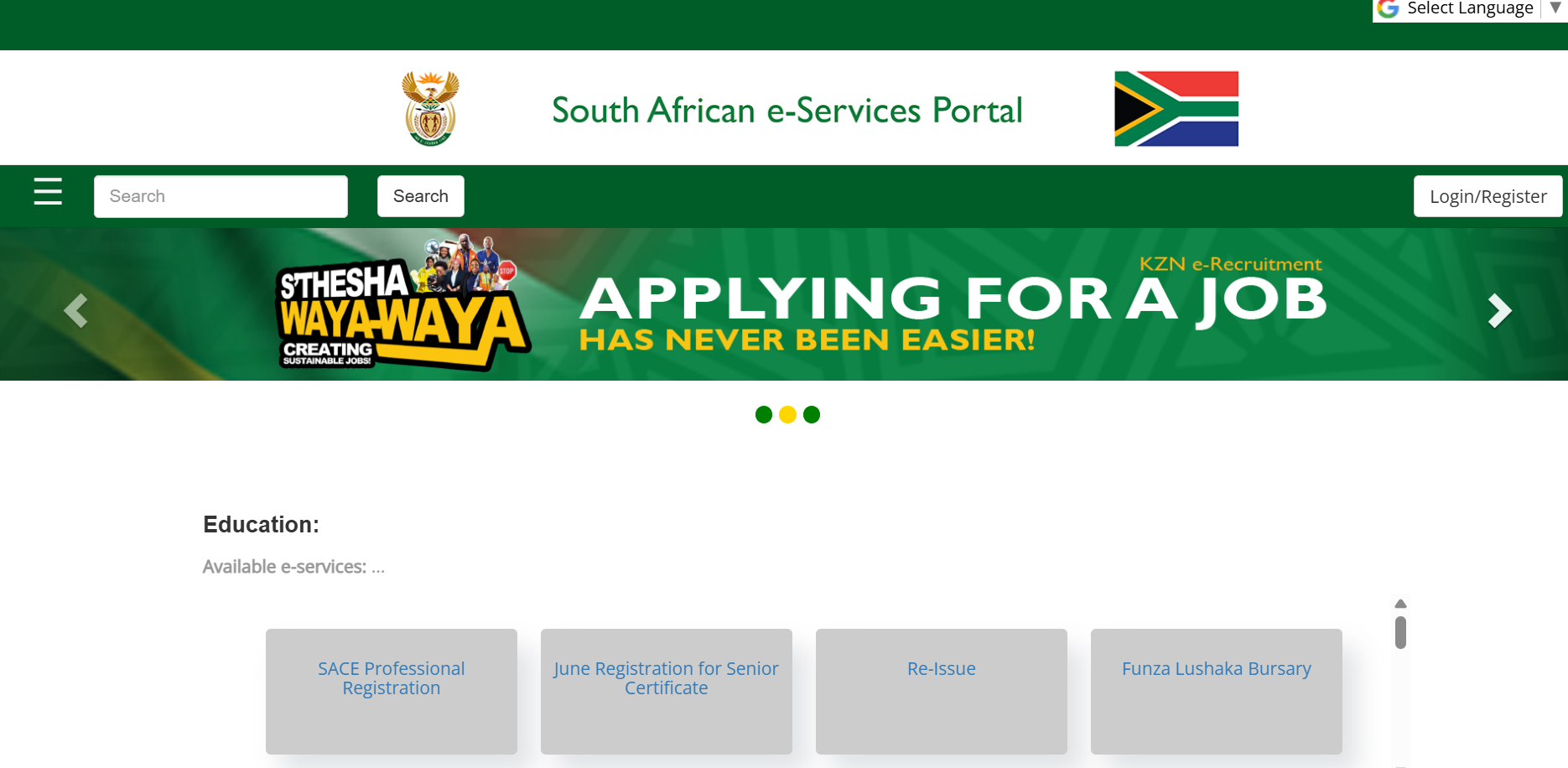
Step 1: Visit the Government eServices Portal
Go to the official SITA eServices portal:
South African Government eServices Portal
This is the official online portal used for SACE applications.
Step 2: Register an eServices Account
Click Register.
You’ll be asked to provide:
- First name
- Surname
- Email address
- Cellphone number
- Username
- Password
You’ll then receive a verification email or OTP.
Activate your account before continuing.
Step 3: Log Into Your Account
Use your new username and password.
Once logged in:
- Select Citizens
- Select Education
- Choose SACE Professional Registration
Step 4: Choose Your Registration Category
Choose the option that applies to you, such as:
- Professionally Qualified Teacher
- Student Teacher
- ECD Practitioner
- TVET Lecturer
- AET Educator
- Special Registration
- Foreign Educator
Selecting the correct category ensures you upload the correct documents.
Step 5: Complete the Online Application
Enter your:
- Personal information
- Contact details
- Qualifications
- Employment details (if required)
- Teaching category
Take your time and ensure every field is accurate.
Step 6: Upload Supporting Documents
Upload each document individually.
SACE recommends uploading documents as clear PDF files.
Typical uploads include:
- ID
- Qualifications
- Academic records
- Proof of payment
- Police clearance (if applicable)
- SAQA certificate (foreign qualifications)
Ensure every document is readable before submitting.
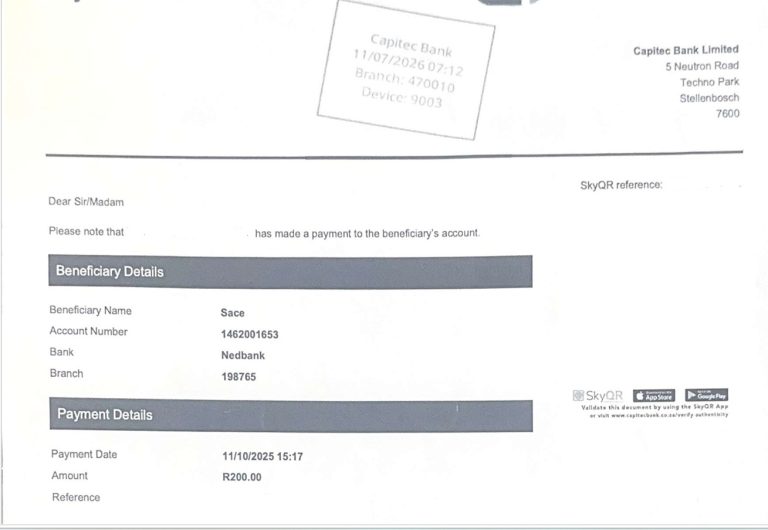
Step 7: Pay the Registration Fee
Pay the applicable fee using the approved payment methods.
Keep your payment confirmation.
Upload proof of payment with your application, even if payment was made online.
Step 8: Review Your Application
Before clicking Submit:
- Check spelling
- Check ID number
- Check qualification details
- Confirm uploaded documents
- Verify payment proof
Small mistakes often delay applications.
Step 9: Submit Your Application
Click Submit.
Your application is then sent to SACE for assessment.
Save:
- Reference number
- Confirmation email
- Payment receipt
Step 10: Wait for Processing
SACE reviews your:
- Identity
- Qualifications
- Supporting documents
- Payment
If additional documents are required, SACE will notify you.
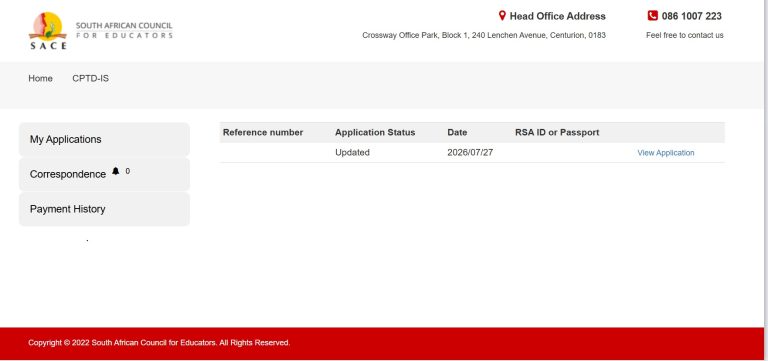
How to Check Your SACE Registration Status
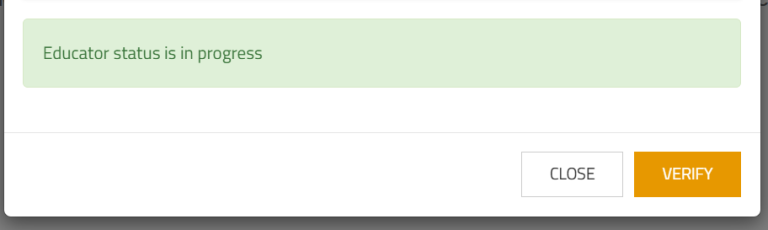
You can monitor your application by logging back into the Government eServices or SACE website portal using your username and password.
Open your submitted application to view updates or requests for additional documents.
If your application takes longer than expected, you can contact SACE directly using the contact details on its official website.
My Experience and Practical Insights
When I first registered with SACE, I went to the SACE Head Office early in the morning, expecting the process to be completed quickly. However, I spent nearly three hours waiting in the queue before I could be assisted.
Only after waiting for several hours was I informed that I could have completed my registration online from home. Had I known this beforehand, I would have saved both time and travel costs.
This experience is one of the main reasons I am sharing this guide. Today, you can complete your SACE registration online from the comfort of your home or office without the need to stand in long queues at a SACE office, provided you have all the required documents ready. The online process is more convenient, allows you to upload your documents electronically, and helps you track your application more efficiently.
My advice is simple: unless you specifically need in-person assistance, register online. It is generally the fastest and most convenient option for most applicants.
Common Mistakes to Avoid
Avoid these common errors:
- Starting the application without all required documents
- Uploading photographs instead of clear PDF scans
- Entering incorrect ID numbers
- Using someone else’s email address
- Forgetting to upload proof of payment
- Applying under the wrong educator category
- Ignoring emails requesting additional documents
Troubleshooting
I forgot my password
Use the Forgot Password option on the eServices login page.
My application is still pending
This often means SACE is verifying your documents.
Log in regularly to check for updates.
My documents were rejected
Upload new certified copies that are clear and legible.
I paid but forgot proof of payment
Upload the payment confirmation through your application if requested.
I cannot log in
Check:
- Username
- Password
- Email verification
If problems continue, contact SACE support.
Helpful Tips and Best Practices
- Apply as early as possible.
- Scan documents using a scanner or a high-quality phone scanning app.
- Save documents as individual PDF files.
- Keep digital backups of everything.
- Use your personal email and cellphone number.
- Keep your payment receipt until registration is complete.
- Check your email regularly for updates from SACE.
Frequently Asked Questions
1. Is SACE registration compulsory?
Yes. Most educators must be registered with SACE before they can legally teach in South Africa.
2. Can student teachers register?
Yes. Student teachers studying towards a recognised teaching qualification can apply for provisional registration.
3. How much does SACE registration cost?
The standard fee is generally R200 for South African citizens and R400 for non-South African citizens. Always verify the latest fees before payment.
4. Can foreign teachers register?
Yes. Foreign-qualified educators can register but must usually provide a SAQA evaluation, police clearance, passport, and valid permit.
5. Do I need certified documents?
Yes. Certified copies are required for most supporting documents.
6. Can I register online?
Yes. First-time applicants can register through the Government eServices portal.
7. How do I update my registration?
Existing educators can log into the online portal or use the appropriate SACE update forms where applicable.
Official Resources and References
- South African Council for Educators (SACE)
- Government eServices Portal
- SACE Registration Requirements
- Department of Basic Education – Register as an Educator
Conclusion
Registering with SACE is an important step toward becoming a professional educator in South Africa. While the application process requires careful preparation, it is straightforward if you gather your documents in advance, complete the online application accurately, and regularly monitor your application status.
Whether you are a newly qualified teacher, student educator, TVET lecturer, or ECD practitioner, completing your SACE registration early will help ensure you are ready for employment opportunities in 2026.
Disclaimer
This guide is for information only. It is based on official SACE publications, South African Government resources, research, and practical experience. Registration requirements, fees, processing times, and online procedures may change. Always verify the latest information through the official SACE and Government eServices websites before submitting your application.

.
About Pheto M
Pheto M is the founder and guide writer of HowToGuide.co.za, a practical information website created to help people find clear, useful and easy-to-understand guidance on everyday topics.
Pheto started HowToGuide.co.za after noticing a common problem: people often need help with important questions, applications, services and everyday decisions, but the information available online can be confusing, difficult to understand or scattered across different sources.
Pheto has experience and knowledge across several areas, including Business, Information Technology (IT), Education and Relationships. These areas have given her a practical understanding of different challenges people face in their personal, professional and everyday lives.
Today, she dedicates her time to researching, writing and updating practical guides designed to help readers understand information and take the right steps with greater confidence.
Her approach is simple: make complex information simple, confusing processes clear, and difficult situations easier to manage.
Through HowToGuide.co.za, Pheto aims to provide practical, accessible and helpful information that readers can use in their everyday lives.
Pheto values feedback from readers and is committed to continually improving the content on HowToGuide.co.za. If you have a question, suggestion, or would like to get in touch, you can email her at admin@howtoguide.co.za. She personally reviews reader feedback and aims to respond within 48 hours.
Limpopo Online Admission Status Check 2027: Step-by-Step (Grade R,1& 8)
September 2, 2026
Reading Time: 9 minutesApplications for Limpopo Online Admissions 2027 are officially closed. Learn how to log into the portal, track your child’s application progress, check placement status, and resolve common login issues.
ACTOM EHS Internship 2026: Requirements & Application Guide. Closed on 31 August 2026
August 9, 2026
Reading Time: 9 minutesLooking to start your career in Environmental, Health, and Safety (EHS)? Explore the ACTOM Power Transformers EHS Internship 2026 in Wadeville. Learn about qualification requirements, key responsibilities, necessary application documents, and step-by-step instructions on how to apply before the 31 August 2026 closing date.
How to Register for Gauteng School Admissions Grade 1 & Grade 8 Online (2027)
August 5, 2026
Reading Time: 5 minutesLearn how to register for Gauteng school admissions (Grade 1 & Grade 8) online for 2027. Step-by-step GDE portal guide, required documents, and practical tips.
How to Register for SACE Online in South Africa (2026): Complete Step-by-Step Guide
August 4, 2026
Reading Time: 6 minutesLearn how to register for SACE online in South Africa. Follow our 2026 step-by-step guide on eServices, required documents, fees, and application steps.
Limpopo Online Admissions 2027: How to Apply for Grade R,1 & 8 (Step-by-Step Guide): Closed 31 August 2026
July 26, 2026
Reading Time: 6 minutesA complete step-by-step guide on how to apply for public school placement using the Limpopo Department of Education Online Learner Admissions System (OLAS) for the 2027 school year. Learn about opening and closing dates, required documents, registration steps, and common mistakes to avoid.
UIF Graduate Internship Programme (2027-2029): How to Apply for 109 Internship Opportunities. Closed
July 25, 2026
Reading Time: 4 minutesApply for the UIF Graduate Internship Programme 2026 (109 Posts). Earn an R8,174.75 monthly stipend. Get application emails, Z83 details, and step-by-step instructions before 7 August 2026.
How to Negotiate a Higher Salary in 2026: A Step-by-Step Guide
July 21, 2026
Reading Time: 5 minutesFeel like your hard work and loyalty are going unrewarded? Discover 5 step-by-step strategies to research your market value, prepare a convincing pitch, and negotiate a higher salary or better benefits package with confidence in 2026.
ATNS Graduate in Training Programme 2026 (24-Month Paid Internship): Closed
July 15, 2026
Reading Time: 5 minutesApply for the ATNS Graduate in Training Programme 2026. Discover 24-month paid graduate opportunities in Business, Logistics, Aviation Security, Information Management, and OHS based in Johannesburg. Closing date: 28 July 2026
Seriti Engineering Learnership 2026 (NVC071/26GS): Apply Online:Closed
July 13, 2026
Reading Time: 5 minutesWant to launch your engineering career in the mining sector? Apply for the Seriti Engineering Learnership 2026 (Reference: NVC071/26GS) at New Vaal Colliery. Discover the minimum N2/Grade 12 requirements, available trades (Diesel Mechanic & Auto Electrician), and follow our step-by-step application guide before the closing date on 21 July 2026.