

Introduction
Losing your job is one of the most stressful experiences anyone can face. Besides the emotional impact, there are immediate financial pressures such as paying rent or a bond, buying groceries, supporting your family, and covering transport costs while searching for new employment.
Fortunately, South Africa’s Unemployment Insurance Fund (UIF) exists to provide temporary financial assistance to qualifying workers who become unemployed through no fault of their own.
If you contributed to UIF while employed, you may qualify for unemployment benefits. However, many applications are delayed because applicants submit incomplete documentation, miss deadlines, or do not understand how the process works.
This guide explains the entire UIF claim process for 2026 in simple English. You’ll learn:
- Who qualifies for UIF
- Which documents you need
- How to apply online or at a Labour Centre
- How UIF payments are calculated
- How to check your application status
- Common mistakes that delay claims
- Practical tips to speed up your application
Who This Guide Is For
This guide is suitable for:
- Employees who have recently been retrenched
- Workers whose fixed-term contracts have ended
- Domestic workers
- Employees whose employers closed down or became insolvent
- Workers dismissed for reasons other than fraud or serious misconduct
- Anyone wanting to understand how UIF works before they lose their job
This guide also contains useful information for family members helping someone submit a UIF claim.
Requirements Before You Apply
Before starting your UIF application, make sure you meet the basic requirements.
You may qualify if:
- You contributed to UIF while employed.
- You worked more than 24 hours per month.
- You became unemployed through no fault of your own.
- You are available for work.
- You register as a work seeker.
- You apply within six months of your last working day.
You generally cannot claim if:
- You resigned voluntarily.
- You were dismissed for fraud or serious misconduct.
- You are already receiving Compensation Fund benefits for the same period.
- You refuse suitable work or training offered by the Department of Employment and Labour.
- You fail to attend required signing appointments.
Documents Required
Before beginning your application, prepare the following:
- South African ID or valid passport
- Completed UI-19 from your previous employer
- Service certificate
- Recent payslips
- Completed UI-2.8 banking form confirmed by your bank
- Proof of work-seeker registration
Additional documents may be required for maternity, illness, adoption or dependant benefits.
Step-by-Step Guide
Step 1: Confirm You Qualify
Before completing any forms, make sure you meet the UIF eligibility requirements.
Applying when you do not qualify wastes valuable time.
Step 2: Request Your UI-19 From Your Employer
The UI-19 is one of the most important documents in your application.
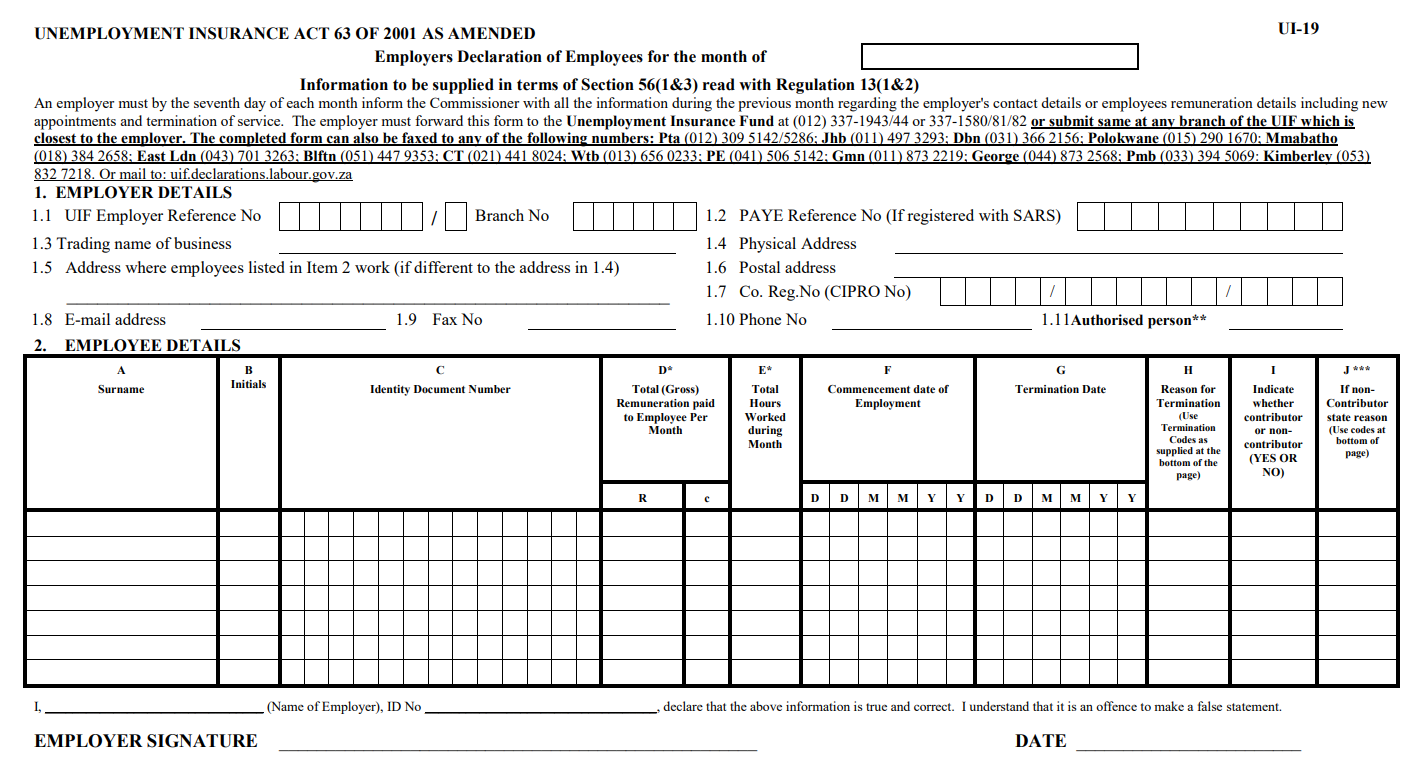
It confirms:
- employment dates
- salary
- UIF contributions
- reason employment ended
Without it, your claim cannot normally be processed.
If your employer delays issuing the form, contact them immediately.
Step 3: Register as a Work Seeker
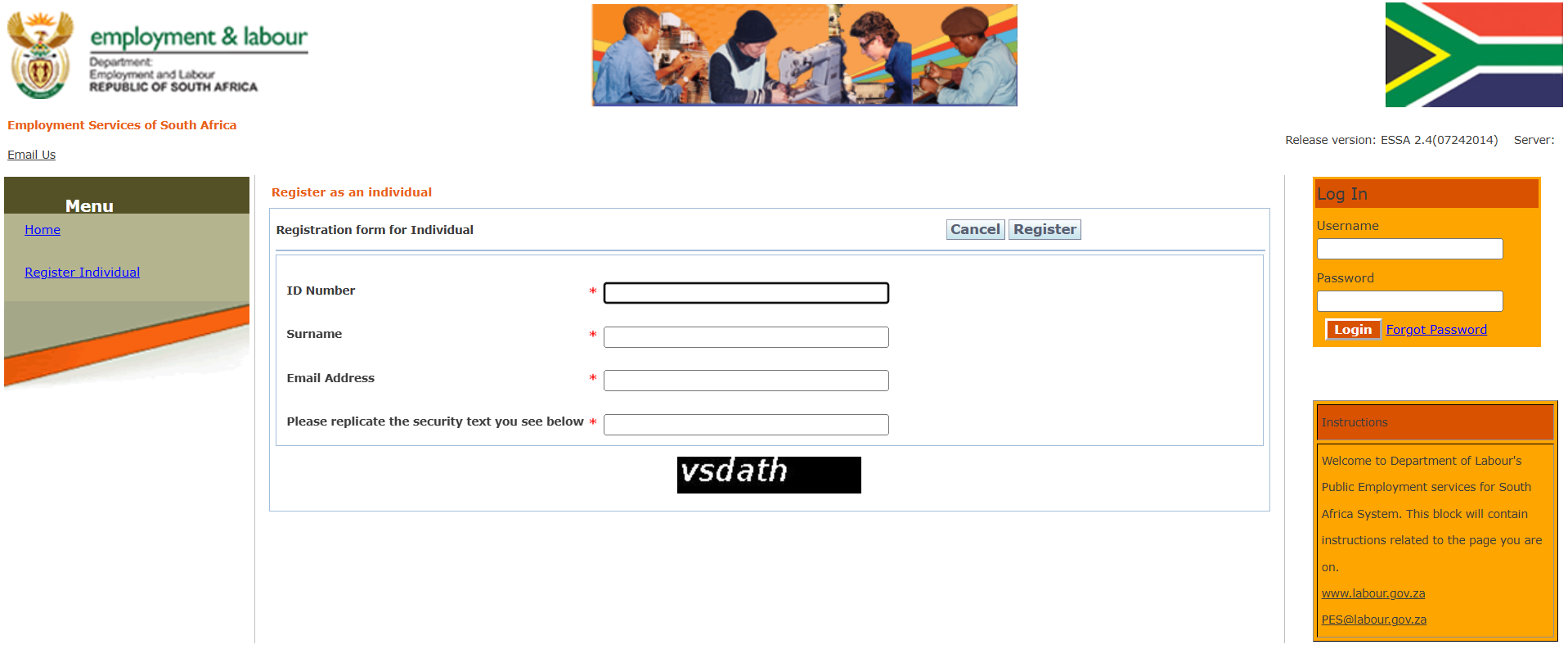
UIF unemployment benefits require you to be registered as a work seeker with the Department of Employment and Labour.
You can complete this registration online or at your nearest Labour Centre.
Step 4: Prepare Your Banking Details
Complete the UIF banking details form (UI-2.8).
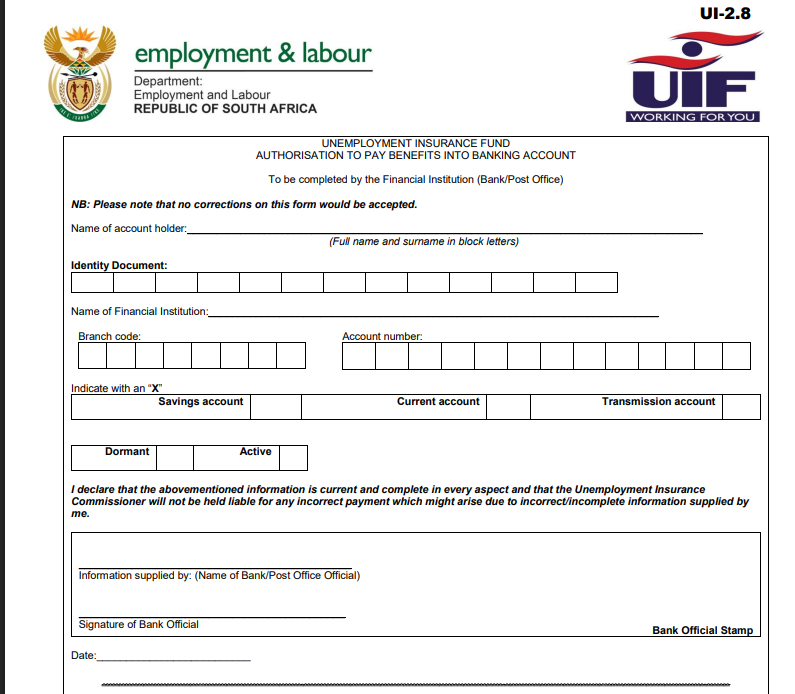
Most banks require:
- your ID
- bank card
- proof of account
Incorrect banking details are among the biggest causes of payment delays.
Step 5: Create a uFiling Account
The fastest application method is through the official uFiling portal.
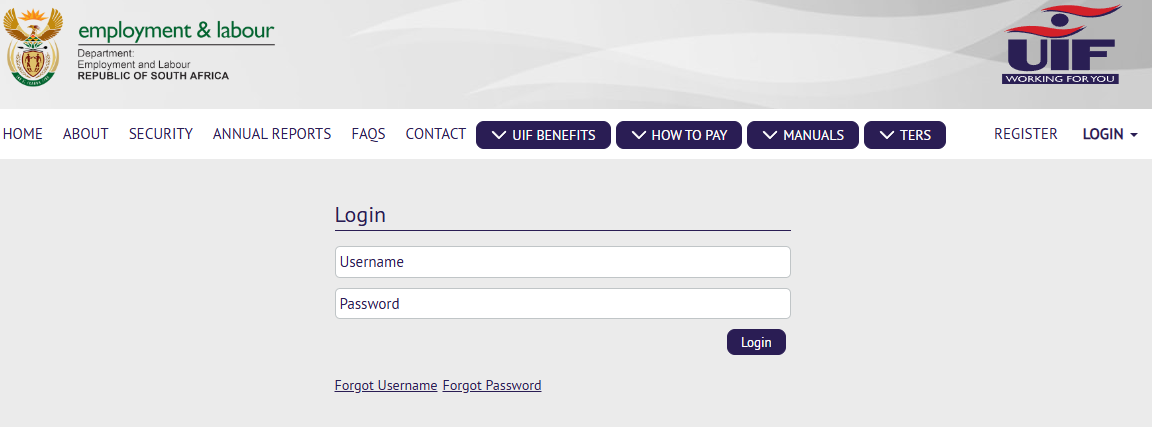
Create your account by providing:
- ID number
- email address
- cellphone number
- personal details
Verify your account using the OTP sent via SMS or email.
Step 6: Complete Your Application
After logging in:
- Select Apply for Benefits
- Choose Unemployment Benefits
- Complete every section carefully
- Ensure all information matches your official documents
Pay special attention to:
- employment dates
- employer details
- banking information
- reason employment ended
Step 7: Upload Supporting Documents
Upload clear copies of:
- ID
- UI-19
- banking confirmation
- payslips
- service certificate
Avoid blurry photographs.
PDF documents usually upload more reliably than photographs.
Step 8: Submit Your Claim
Before clicking Submit:
1.Review every section.
2. Check your banking details.
3. Confirm every document has uploaded successfully.
After submission, save your reference number immediately.
Take a screenshot and keep it safely.
Step 9: Attend Your Signing Appointment
Once your application is approved, you’ll receive a signing date.
Visit the Labour Centre with:
- ID
- UIF checklist
- required forms
After signing, you’ll receive your UI-6A.
You’ll continue signing approximately every four weeks while receiving benefits.
Step 10: Track Your Application
You can monitor your application by:
- logging into uFiling
- using the USSD service
- calling the UIF Call Centre
- visiting your Labour Centre
Common status messages include:
- Sent to Assessor
- Pending Adjudication
- Payment Reserved
- Payment Finalised
My Experience and Practical Insights
Most delays do not occur because applicants are ineligible for benefits. Instead, they usually happen because one or more steps in the application process have not been completed correctly.
One of the most important steps is ensuring that your personal information matches your official records. Details such as your South African ID number, names, and contact information should be accurate before you submit your application.
Supporting documents should also be prepared in advance. Upload clear, complete, and readable copies of every required document. Blurred images, missing pages, or incorrect files can result in requests for additional information, delaying the processing of your claim.
Banking verification is another critical stage. Always provide banking details that belong to you and double-check that the account number, branch code, and account type are correct. Incorrect banking information can prevent your benefits from being paid on time.
It is also important to remember that submitting your application is not the end of the process. Regularly check your UIF profile, email, and SMS notifications for updates or requests for additional information. Responding promptly helps keep your application moving through the verification process.
The employer also plays an important role. Your application cannot be fully processed until your employer has submitted the required UIF declarations and employment information. If these declarations are outstanding, your claim may remain pending even if you have completed every required step.
Finally, keep copies of all documents you submit, along with your UIF reference number and any confirmation emails or SMS messages. These records make it much easier to track your application and resolve any issues if they arise.
Taking the time to complete each stage carefully, checking your information before submission, and monitoring your application after submission can significantly reduce delays and improve the overall claims process.
Common Mistakes to Avoid
Avoid these common errors:
- Waiting longer than six months to apply.
- Entering incorrect banking details.
- Uploading blurry or incomplete documents.
- Forgetting to obtain the UI-19 from your employer.
- Missing Labour Centre signing dates.
- Losing your UIF reference number.
- Assuming approval automatically means payment.
- Ignoring requests for additional documentation.
- Using outdated contact information.
Troubleshooting
My employer won’t provide a UI-19
Contact your employer immediately.
If they refuse, report the matter to the Department of Employment and Labour.
My application is taking too long
First:
- check your status online
Then:
- call the UIF Call Centre
Finally:
- visit your Labour Centre if necessary.
Many delays occur because employer declarations are still outstanding.
My banking details changed
Update your banking information immediately before payment is processed.
My claim was rejected
Read the reason carefully.
Many rejected claims can be corrected by supplying missing documents or correcting inaccurate information.
I missed my signing appointment
Visit the Labour Centre as soon as possible.
Explain why you missed the appointment and ask about reactivating your claim.
Helpful Tips and Best Practices
To improve your chances of a smooth application:
- Apply as soon as possible after losing your job.
- Keep digital copies of every document.
- Save screenshots of important confirmations.
- Use one email address consistently.
- Double-check banking details before submitting.
- Respond quickly to UIF requests.
- Check your claim status regularly.
- Keep copies of every form you submit.
- Arrive early for Labour Centre appointments.
- Store your reference number somewhere safe.
Frequently Asked Questions
1. Can I claim UIF if I resigned?
Generally, no. UIF unemployment benefits normally do not cover voluntary resignations unless constructive dismissal is confirmed through the CCMA.
2. How long do I have to apply?
You should apply within six months of your last day of employment.
3. How long does UIF take to pay?
Straightforward claims may be processed within 10 to 15 working days, but many applications take several weeks depending on verification and employer submissions.
4. How much UIF will I receive?
Your benefit depends on:
- previous salary
- UIF contributions
- available credit days
Higher salaries are subject to the UIF earnings ceiling.
5. Can domestic workers claim UIF?
Yes, provided UIF contributions were made and the worker meets the qualifying requirements.
6. What happens if my employer never paid UIF?
You may still qualify for benefits if deductions were made from your salary. Report the employer to the Department of Employment and Labour.
7. Can I apply online?
Yes.
The uFiling system allows eligible applicants to register, submit documents and monitor their claims online.
8. What documents are most important?
The key documents include:
- ID
- UI-19
- banking details
- service certificate
- payslips
- proof of work-seeker registration
Official Resources and References
For the latest information, forms, and updates, use these official resources:
- Department of Employment and Labour
- UIF uFiling Portal
- UIF Call Centre: 0800 030 007
- Department of Employment and Labour Contact Centre: 0800 843 843
- Your nearest Department of Employment and Labour office
Always use official government sources when submitting applications or downloading UIF forms.
Conclusion
UIF benefits provide important short-term financial support while you search for new employment. Although the application process may seem complicated at first, being organised can make a significant difference.
Prepare your documents carefully, apply as early as possible, monitor your application regularly, and attend every required signing appointment.
Most delays are preventable. By following the steps in this guide and ensuring all information is accurate, you’ll greatly improve your chances of receiving your UIF benefits without unnecessary setbacks.
Remember that UIF is temporary assistance designed to help you while you actively seek new employment. Use this period to update your CV, register on job portals, apply for vacancies, and develop new skills that can improve your future employment opportunities.
Disclaimer
This guide is intended for general informational purposes only and is based on official government information, publicly available resources, research, and practical experience at the time of writing. It does not constitute legal, financial, or professional advice. UIF legislation, qualifying requirements, payment calculations, contribution limits, and application procedures may change without notice. Always verify the latest information with the Department of Employment and Labour or the official uFiling portal before submitting your claim. Approval of a UIF application is subject to the Department’s assessment and applicable legislation.

.
About Pheto M
Pheto M is the founder and guide writer of HowToGuide.co.za, a practical information website created to help people find clear, useful and easy-to-understand guidance on everyday topics.
Pheto started HowToGuide.co.za after noticing a common problem: people often need help with important questions, applications, services and everyday decisions, but the information available online can be confusing, difficult to understand or scattered across different sources.
Pheto has experience and knowledge across several areas, including Business, Information Technology (IT), Education and Relationships. These areas have given her a practical understanding of different challenges people face in their personal, professional and everyday lives.
Today, she dedicates her time to researching, writing and updating practical guides designed to help readers understand information and take the right steps with greater confidence.
Her approach is simple: make complex information simple, confusing processes clear, and difficult situations easier to manage.
Through HowToGuide.co.za, Pheto aims to provide practical, accessible and helpful information that readers can use in their everyday lives.
Pheto values feedback from readers and is committed to continually improving the content on HowToGuide.co.za. If you have a question, suggestion, or would like to get in touch, you can email her at admin@howtoguide.co.za. She personally reviews reader feedback and aims to respond within 48 hours.
How to Save Money from Your SASSA Grant Every Month (2026)
July 21, 2026
Reading Time: 6 minutesLiving on a SASSA grant makes saving feel impossible, but even small amounts add up. Discover 10 practical ways to save R20 to R100 each month, protect your money from temptation, and build an emergency safety net.
How to Reverse Money on Capitec: Step-by-Step (2026)
July 16, 2026
Reading Time: 6 minutesMade a payment mistake on the Capitec App? While there isn’t a simple “undo” button for EFTs or transfers, recovering your funds is still possible. Learn when a transaction can be reversed, how to initiate an urgent payment recall, and step-by-step methods to secure your money quickly.
How to Check Your SASSA Status Online (2026)
July 7, 2026
Reading Time: 7 minutesNeed to track your SASSA application or check your payment date? From using the official online portal to quick WhatsApp, SMS, and USSD code methods, this comprehensive, step-by-step guide breaks down how to check your SASSA status in 2026—including what your status message means and the latest 2026/2027 grant payment schedules.
How to Claim UIF in South Africa (2026): A Complete Step-by-Step Guide
July 6, 2026
Reading Time: 7 minutesLost your job and need financial relief? Follow our complete, step-by-step guide to claiming your UIF in South Africa online or in person for 2026.
How to Open and Use FNB eWallet on WhatsApp (2026)
July 3, 2026
Reading Time: 6 minutesWant to use your mobile wallet directly on chat? Discover how to use FNB eWallet on WhatsApp to easily send, receive, and withdraw money across South Africa. This step-by-step guide covers mandatory registration details, instant cash out at retailers, low transactional fees, and crucial security tips.