
Introduction
Digital banking in South Africa continues to evolve, making it easier for people to manage money directly from their smartphones. One of the latest innovations is FNB eWallet on WhatsApp, which allows users to create and manage an eWallet using WhatsApp without visiting a bank branch.
Unlike the traditional eWallet service, where someone first had to send you money before you could use it, the WhatsApp version allows eligible users to create their own wallet, set up a secure PIN, receive payments, send money, withdraw cash, buy prepaid products, pay at participating retailers, and even access small interest-free cash advances—all through a familiar messaging platform.
This guide explains everything you need to know about setting up and using FNB eWallet on WhatsApp in 2026.
Who This Guide Is For
This guide is suitable for:
- People who do not have a traditional bank account
- First-time FNB eWallet users
- Anyone wanting to send or receive money using WhatsApp
- People looking for a simple digital wallet
- Students and young adults
- Family members sending money to relatives
- Small business owners accepting payments
- Existing FNB customers who want to link their eWallet
Requirements
Before opening your eWallet, make sure you have the following:
| Requirement | Why You Need It |
|---|---|
| Smartphone with WhatsApp | Registration happens through WhatsApp |
| South African cellphone number | Used to create and access your wallet |
| South African ID number | Required for identity verification |
| Personal details | Name, surname and source of funds |
| Secure 5-digit PIN | Protects your wallet |
| Internet connection | Needed to use WhatsApp |
Official WhatsApp Number
Before starting, save the official FNB WhatsApp number:
087 392 5538
Always check for the blue verified business tick before sharing personal information.
Step-by-Step Guide
Step 1: Save the Official WhatsApp Number
Save the official FNB WhatsApp number on your phone.
Name it something easy to recognise, such as:
FNB eWallet
Step 2: Start the Conversation
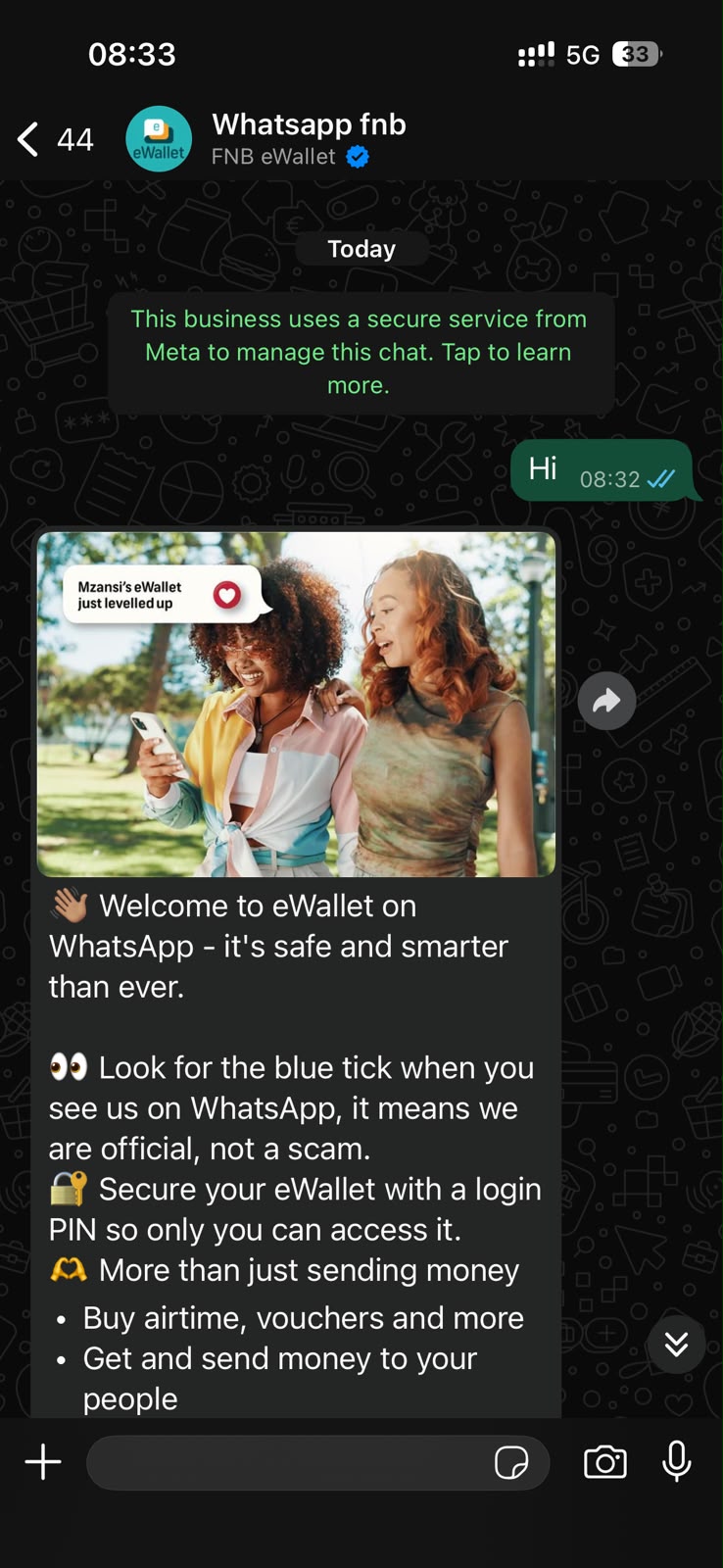
Open WhatsApp.
Find the saved contact.
Send a simple message:
Hi
The automated assistant will begin the registration process.
Step 3: Complete Your Registration
Follow the prompts and provide:
- First name
- Surname
- South African ID number
- Source of funds
This information helps verify your identity.
Step 4: Create Your 5-Digit PIN
You’ll be asked to create a secure five-digit PIN.
Choose a PIN that:
- is easy for you to remember
- is difficult for others to guess
Never share this PIN with anyone.
Step 5: Verify the Official Account
Before entering any personal information, confirm that the WhatsApp account has the blue verified business tick.
If it does not, stop immediately.
Step 6: Start Using Your eWallet
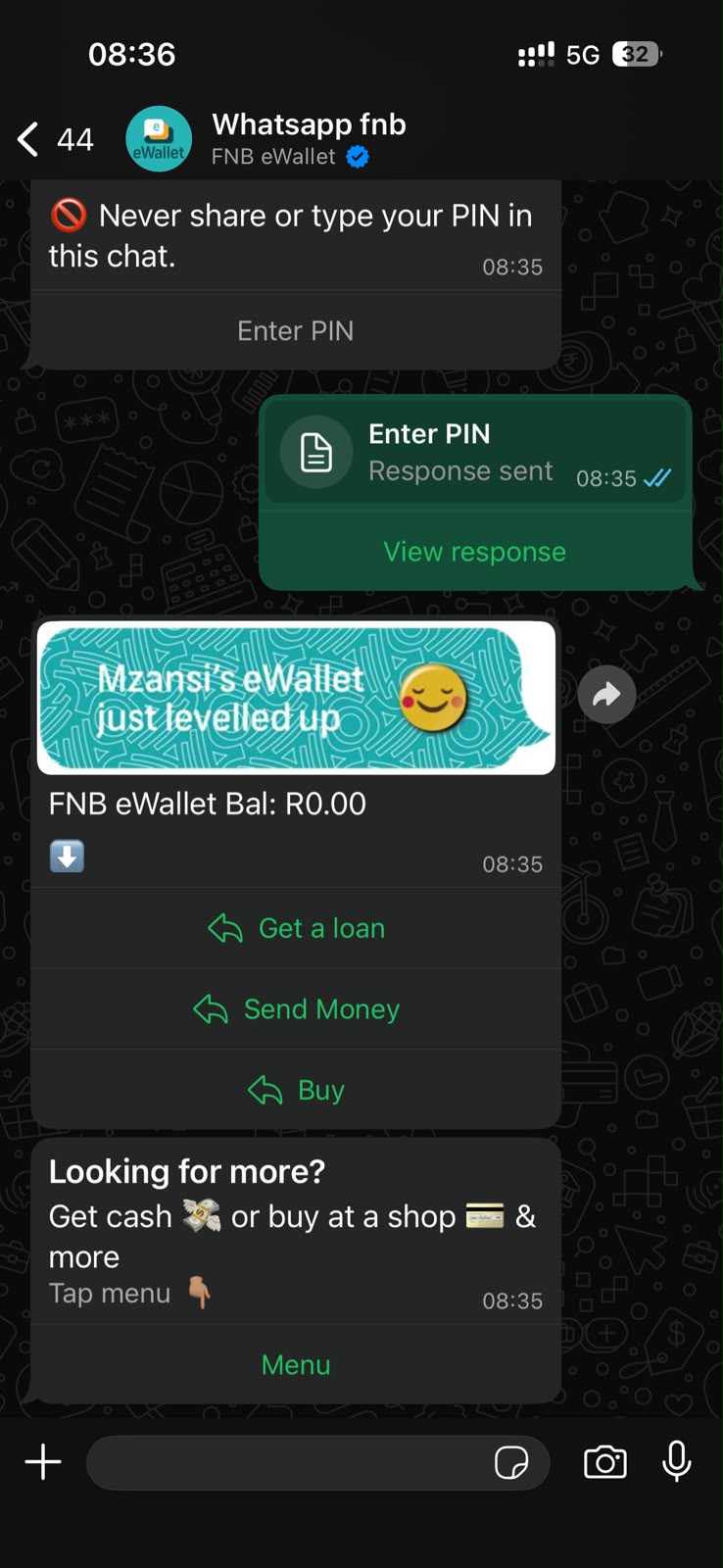
Once registration is complete, you can begin using services such as:
- receiving money
- sending money
- cash withdrawals
- airtime purchases
- electricity purchases
- data purchases
- voucher purchases
- PayShap
- cash advances (if eligible)
How to Send Money
Open the WhatsApp chat.
Select:
Send Money
Then:
- enter the recipient’s South African cellphone number
- enter the amount
- confirm using your PIN
How to Receive Money
Give the sender your South African cellphone number.
The money will be deposited directly into your eWallet.
How to Withdraw Cash
Dial:
*120*277*4#
You’ll receive a once-off PIN.
Visit participating retailers such as:
- Pick n Pay
- Shoprite
- Checkers
- Usave
- PEP
- Ackermans
Present the PIN to the cashier to receive your cash.
How to Buy Airtime, Data and Electricity
Inside WhatsApp:
- select Buy
- choose airtime, data or electricity
- enter the required information
- confirm using your PIN
How to Buy Digital Vouchers
Select:
Buy
Then choose:
Vouchers
Available vouchers may include:
- Uber
- Netflix
- entertainment
- transport
- other participating brands
How to Pay at Fuel Stations
Generate a one-time PIN by dialling:
*120*277*4#
Participating fuel stations include:
- Shell
- Sasol
- Engen
- TotalEnergies
Present the PIN at the cashier.
How to Use PayShap
PayShap allows instant payments using your cellphone number.
You can:
- receive money
- send money
- transfer between banks
Transaction fees depend on whether the payment is made to an FNB customer or another bank.
How to Link Your eWallet to the FNB App
Existing FNB customers can link their eWallet.
Open the FNB App.
Before logging in:
- choose eWallet
- log in
- select Continue
- verify your cellphone number using the OTP
Once linked, you can move money between your FNB account and eWallet.
My Experience and Practical Insights
My Experience Using FNB eWallet on WhatsApp
After using FNB eWallet on WhatsApp myself, I found the registration process to be straightforward and easy. Setting up the service took only a few minutes, and the WhatsApp prompts were simple to follow. I did not need to visit a bank branch or complete lengthy paperwork, which made the experience convenient.
From reviewing how South Africans use digital payment platforms, one thing is clear: people want banking services that are simple, fast, and accessible. FNB eWallet on WhatsApp meets this need by allowing users to manage their money directly from WhatsApp.
I also noticed that many of the problems people experience are not because the service is difficult to use. Instead, they often happen when users interact with fake WhatsApp accounts or forget their eWallet PIN. Taking a few moments to verify that you are chatting with the official FNB WhatsApp account and choosing a PIN that you can remember can help avoid these issues.
Another thing I discovered is that users who take the time to explore all the available features get much more value from the service. Beyond simply receiving money, you can use FNB eWallet on WhatsApp to send money, make PayShap payments, transfer funds to bank accounts, buy prepaid airtime and electricity, and withdraw cash at participating retailers. Learning how these features work can make everyday banking faster and more convenient.
Common Mistakes to Avoid
Avoid these common errors:
- Messaging unofficial WhatsApp numbers.
- Ignoring the verified business tick.
- Sharing your PIN.
- Choosing an easy-to-guess PIN.
- Forgetting your cellphone number is linked to your wallet.
- Sending money to the wrong cellphone number.
- Exceeding transaction limits.
- Leaving your phone unlocked.
- Ignoring SMS security notifications.
Troubleshooting
I forgot my PIN
Contact FNB through the official WhatsApp channel or customer support to follow the PIN reset process.
I cannot access WhatsApp
Restore your WhatsApp account using your registered cellphone number before attempting to access your eWallet.
I lost my phone
Immediately:
- block your SIM card with your mobile network provider
- contact FNB
- secure your account
My payment failed
Check:
- your wallet balance
- network connection
- transaction limits
If the problem continues, contact FNB support.
I sent money to the wrong number
Contact FNB immediately.
Recovery depends on whether the funds have already been claimed.
Helpful Tips and Best Practices
To keep your wallet secure:
- Always use the official WhatsApp number.
- Look for the verified business tick.
- Never share your PIN.
- Save your PIN somewhere safe.
- Keep your cellphone number active.
- Monitor your transactions regularly.
- Log out of shared devices.
- Keep WhatsApp updated.
- Enable phone security features such as fingerprint or face recognition.
- Report suspicious activity immediately.
Frequently Asked Questions
1. Do I need an FNB bank account?
No.
You can create an FNB eWallet without opening a traditional FNB bank account.
2. What is the official WhatsApp number?
The official number is:
087 392 5538
Always verify the blue business tick.
3. Is there a monthly fee?
No.
There is currently no monthly fee for maintaining an FNB eWallet.
4. Where can I withdraw cash?
Cash withdrawals are available at participating retailers including:
- Pick n Pay
- Shoprite
- Checkers
- Usave
- PEP
- Ackermans
5. Can I buy electricity and airtime?
Yes.
You can purchase airtime, mobile data, electricity and selected vouchers directly through WhatsApp.
6. Can I borrow money?
Eligible users may qualify for an interest-free cash advance between R50 and R500, subject to FNB’s approval criteria.
7. What is the maximum amount I can send?
The maximum send limit per transaction is currently R3,000.
8. What is the maximum wallet balance?
The wallet balance may not exceed R25,000, subject to FNB’s current limits.
Official Resources and References
For the latest information, registration, fees, limits, and customer support, use the following official resources:
- FNB South Africa
- FNB eWallet
- FNB WhatsApp Banking
- FNB App
- FNB Help Centre
- Official FNB WhatsApp Number: 087 392 5538
Always obtain information directly from FNB before making financial decisions or transactions.
Conclusion
FNB eWallet on WhatsApp has transformed the traditional eWallet service into a convenient digital wallet that many South Africans can access without opening a conventional bank account.
Whether you want to receive money from family, send cash to friends, buy airtime, pay for fuel, withdraw cash at participating retailers, or use PayShap for instant payments, the service offers a simple and familiar way to manage everyday financial needs through WhatsApp.
By following the steps in this guide, protecting your PIN, and using only the official verified WhatsApp account, you can enjoy the convenience of digital payments while keeping your money secure.
Disclaimer
This guide is intended for general informational purposes only and is based on publicly available information, official FNB communications, research, expert guidance, and practical experience. Features, eligibility requirements, transaction limits, participating retailers, fees, supported products, and service availability may change without notice. Always verify the latest information through FNB’s official website, WhatsApp Banking service, or customer support before registering for or using FNB eWallet. Approval for services such as cash advances is subject to FNB’s assessment and applicable terms and conditions.

.
About Pheto M
Pheto M is the founder and guide writer of HowToGuide.co.za, a practical information website created to help people find clear, useful and easy-to-understand guidance on everyday topics.
Pheto started HowToGuide.co.za after noticing a common problem: people often need help with important questions, applications, services and everyday decisions, but the information available online can be confusing, difficult to understand or scattered across different sources.
Pheto has experience and knowledge across several areas, including Business, Information Technology (IT), Education and Relationships. These areas have given her a practical understanding of different challenges people face in their personal, professional and everyday lives.
Today, she dedicates her time to researching, writing and updating practical guides designed to help readers understand information and take the right steps with greater confidence.
Her approach is simple: make complex information simple, confusing processes clear, and difficult situations easier to manage.
Through HowToGuide.co.za, Pheto aims to provide practical, accessible and helpful information that readers can use in their everyday lives.
Pheto values feedback from readers and is committed to continually improving the content on HowToGuide.co.za. If you have a question, suggestion, or would like to get in touch, you can email her at admin@howtoguide.co.za. She personally reviews reader feedback and aims to respond within 48 hours.
How to Save Money from Your SASSA Grant Every Month (2026)
July 21, 2026
Reading Time: 6 minutesLiving on a SASSA grant makes saving feel impossible, but even small amounts add up. Discover 10 practical ways to save R20 to R100 each month, protect your money from temptation, and build an emergency safety net.
How to Reverse Money on Capitec: Step-by-Step (2026)
July 16, 2026
Reading Time: 6 minutesMade a payment mistake on the Capitec App? While there isn’t a simple “undo” button for EFTs or transfers, recovering your funds is still possible. Learn when a transaction can be reversed, how to initiate an urgent payment recall, and step-by-step methods to secure your money quickly.
How to Check Your SASSA Status Online (2026)
July 7, 2026
Reading Time: 7 minutesNeed to track your SASSA application or check your payment date? From using the official online portal to quick WhatsApp, SMS, and USSD code methods, this comprehensive, step-by-step guide breaks down how to check your SASSA status in 2026—including what your status message means and the latest 2026/2027 grant payment schedules.
How to Claim UIF in South Africa (2026): A Complete Step-by-Step Guide
July 6, 2026
Reading Time: 7 minutesLost your job and need financial relief? Follow our complete, step-by-step guide to claiming your UIF in South Africa online or in person for 2026.
How to Open and Use FNB eWallet on WhatsApp (2026)
July 3, 2026
Reading Time: 6 minutesWant to use your mobile wallet directly on chat? Discover how to use FNB eWallet on WhatsApp to easily send, receive, and withdraw money across South Africa. This step-by-step guide covers mandatory registration details, instant cash out at retailers, low transactional fees, and crucial security tips.